
Mazda 3 Service Manual: Passenger Compartment Temperature Sensor Removal/Installation [Full Auto Air Conditioner]
1. Disconnect the negative battery cable..
2. Remove the following parts:
a. Front scuff plate.
b. Front side trim.
c. Dashboard under cover.
d. Upper panel.
e. Shift lever knob (MTX).
f. Selector lever knob (ATX).
g. Shift panel.
h. Side wall.
i. Console.
j. Hood release lever.
k. Lower panel (driver-side).
3. Disconnect the passenger compartment temperature sensor connector.
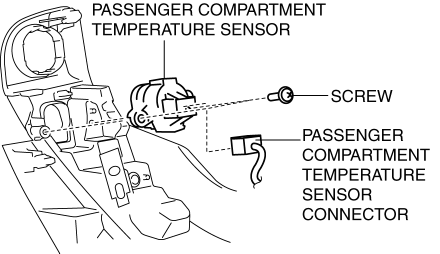
4. Remove the screw.
5. Remove the passenger compartment temperature sensor.
6. Install in the reverse order of removal.
 Passenger Compartment Temperature Sensor Inspection [Full Auto Air Conditioner]
1. Measure the temperature around the passenger compartment temperature sensor
and measure the resistance between passenger compartment temperature sensor terminals
B and D.
If the cha ...
 Power Metal Oxide Semiconductor Field Effect Transistor (Power Mos Fet) Inspection
[Full Auto Air Conditioner]
Power Metal Oxide Semiconductor Field Effect Transistor (Power Mos Fet) Inspection
[Full Auto Air Conditioner]
1. Verify that the continuity between the power MOS FET terminals is as indicated
in the table.
If there is any malfunction, replace the power MOS FET.
If the blower motor operat ...
Other materials:
Rear Combination Light Removal/Installation
4SD
1. Disconnect the negative battery cable..
2. Remove the following parts:
a. Trunk mat.
b. Trunk board.
c. Trunk end trim.
d. Trunk side trim.
3. Disconnect the connectors shown in the figure and remove the nuts.
4. Pull the rear combination light in the direction of the arrow ...
Pilot Bearing Inspection [G66 M R]
1. Perform the following procedures.
a. Remove the battery cover..
b. Disconnect the negative battery cable.
c. Remove the battery component. (ex: battery, battery tray and PCM component).
d. Remove the air cleaner component..
e. Remove the exhaust manifold insulator installation bolts an ...
Passenger Compartment Temperature Sensor Inspection [Full Auto Air Conditioner]
1. Measure the temperature around the passenger compartment temperature sensor
and measure the resistance between passenger compartment temperature sensor terminals
B and D.
If the characteristics of the passenger compartment temperature sensor are
not as shown in the graph, repla ...
