
Subaru Solterra 2023-2026 Owner's Manual: Before driving
Before operating your Subaru Solterra, carefully follow the recommendations below to ensure maximum safety, proper vehicle control, and a confident driving experience in all conditions.
Installing floor mats
Always use floor mats that are specifically engineered for the Subaru Solterra, matching both the model and production year. Properly fitted mats are essential for maintaining safe pedal operation and preventing unwanted movement during driving. Secure installation ensures that your Subaru Solterra remains safe and responsive at all times.
1. Insert the retaining hooks (clips) into the designated eyelets on the floor mat.
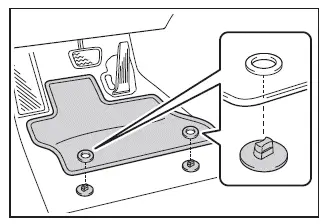
2. Rotate the upper knob of each retaining hook (clip) to firmly lock the floor mats in place and prevent shifting.
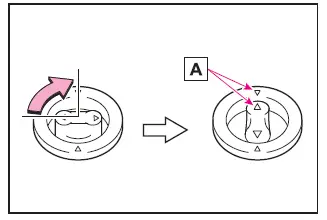
Always ensure proper alignment of the
 marks A to guarantee correct positioning of the floor mats in your Subaru Solterra.
Please note that depending on the configuration of your Subaru Solterra, the design and shape of the retaining hooks (clips) may vary slightly from those illustrated.
WARNING
Strictly observe the following precautions when using floor mats in your Subaru Solterra.
Failure to properly secure the driver’s floor mat may result in it sliding forward and interfering with pedal operation. This can cause unintended acceleration or hinder braking performance, significantly increasing the risk of a serious accident.
Such situations can lead to loss of control and may result in severe injury or fatal consequences.
■ When installing the driver's floor mat
- Never install floor mats designed for other Subaru models or different model years, even if they are genuine Subaru products.
- Use only floor mats specifically intended for the driver's position in the Subaru Solterra.
- Always secure the mat using all provided retaining hooks (clips) to prevent movement.
- Do not stack multiple floor mats on top of each other.
- Never install a floor mat upside-down or reversed.
■ Before driving
- Verify that the floor mat is correctly positioned and securely fastened using all retaining clips, especially after cleaning or repositioning it.
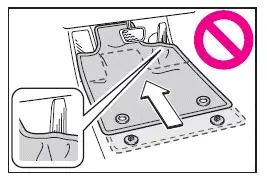
- With the EV system turned off and the shift position set to P, fully press each pedal to confirm there is no interference from the floor mat.
 For safe use
...
 For safe driving
For optimal safety in your Subaru Solterra, always adjust your seating
position, mirrors, and driving posture correctly before starting your journey.
Correct driving posture
Adjust the se ...
Other materials:
No.6 Bsm Indicator Light Flashes While Not Under Bsm Indicator Light Flashing
Conditions (No Combination Switch Operation (Turn Signal Switch)) [Blind Spot Monitoring
(Bsm)]
6
BSM indicator light flashes while not under BSM indicator light-flashing
conditions (no combination switch operation (turn signal switch)
Description
The BSM indicator light flashes despite not satisfying the BSM indicator
l ...
Back Up Light Switch Removal/Installation [C66 M R]
1. Remove the battery cover..
2. Disconnect the negative battery cable..
3. Remove the aerodynamic under cover No.2..
4. Remove in the order indicated in the table.
5. Install in the reverse order of removal.
1
Back-up light switch connector
2
...
Auto Leveling Sensor Removal/Installation
1. Disconnect the negative battery cable..
2. Lift up the vehicle.
3. Disconnect the quick release connector. (charcoal canister side).
4. Remove in the order indicated in the table.
1
Bolt
2
Connector
3
Auto ...
