
Mazda 3 Owners Manual: Opening the Hood
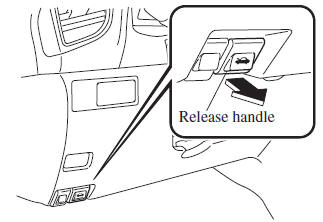
- With the vehicle parked, pull the release handle to unlock the hood.
- Insert your hand into the hood opening, slide the latch lever to the right, and lift up the hood.
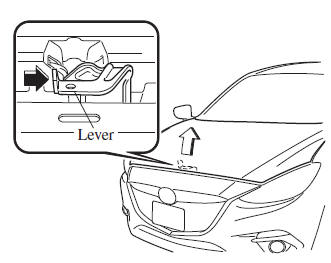
NOTE The lever is located a little to the left of center when facing the vehicle.
- Grasp the support rod in the padded area and secure it in the support rod hole indicated by the arrow to hold the hood open.
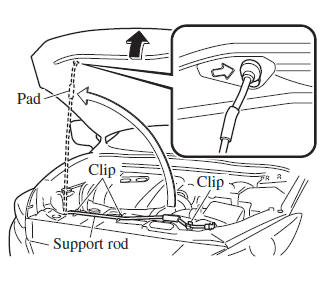
 Hood
Hood
WARNING
Always check that the hood is closed
and securely locked:
A hood that is not closed and securely
locked is dangerous as it could fl y open
while the vehicle is moving and ...
 Closing the Hood
Check under the hood area to make
certain all filler caps are in place and all
loose items (e.g. tools, oil containers,
etc.) have been removed.
Lift the hood, grasp the padded area on
th ...
Other materials:
Rear Cross Traffic Alert (RCTA)
The Rear Cross Traffic Alert (RCTA) system is designed to assist the driver
in checking the
area to the rear of the vehicle on both sides while the vehicle is reversing by
alerting the
driver to the presence of vehicles approaching the rear of the vehicle.
The Rear Cross Traffic Alert (RCTA ...
Do-it-yourself service precautions
When performing maintenance on the Subaru Solterra самостоятельно,
важливо суворо дотримуватись правильних процедур,
описаних у відповідних розділах, щоб забезпечити
безпеку та уник ...
PDA (Proactive driving assist)
In the Subaru Solterra, the Proactive Driving Assist (PDA) system
continuously monitors the surroundings and, when a detectable object is identified,
it can automatically apply gentle braking and subtle steering input to help maintain
a safe distance and reduce the likelihood of getting too cl ...
