
Mazda 3 Service Manual: A/C Unit Removal/Installation
1. Set the air mix mode to MAX COLD.
2. Disconnect the negative battery cable..
3. Discharge the refrigerant..
4. Drain the engine coolant..
5. Remove the plug hole plate.
6. Remove the charge air cooler cover. (MZR 2.3 DISI Turbo).
7. Remove the insulator. (MZR 2.3 DISI Turbo)
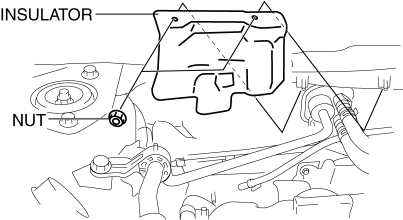
8. Remove the bolt. (SKYACTIV-G 2.0, MZR 2.5, MZR 2.3 DISI Turbo)
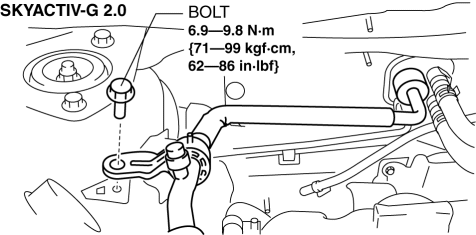
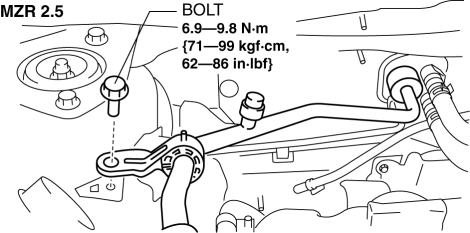
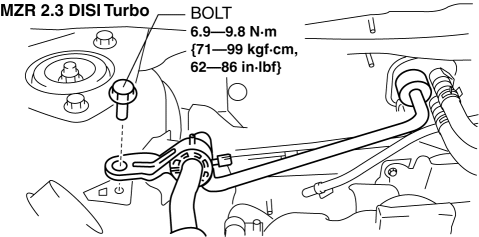
9. Remove the nut. (MZR 2.0)
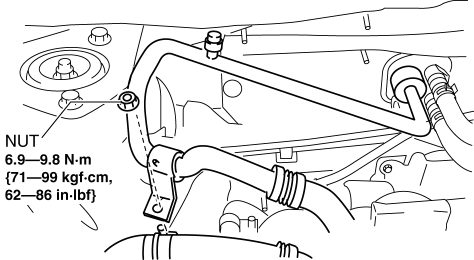
10. Disconnect the following parts from the A/C unit.
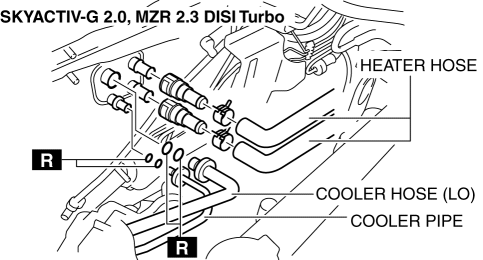
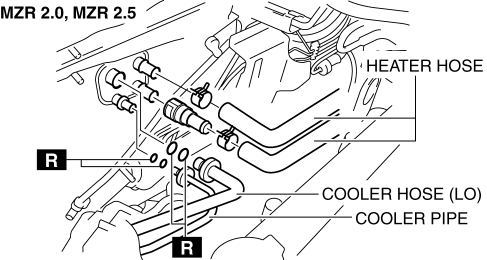
CAUTION:
-
If moisture or foreign material enters the refrigeration cycle, cooling ability will be lowered and abnormal noise or other malfunction could occur. Always plug open fittings immediately after removing any refrigeration cycle parts.
a. Cooler hose (LO).
b. Cooler pipe.
c. Heater hose.
11. Remove the following parts:
a. Front doors.
b. Front scuff plate.
c. Front side trim.
d. Dashboard under cover.
e. Glove compartment.
f. Upper panel.
g. Shift lever knob (MTX).
h. Selector lever knob (ATX).
i. Shift panel.
j. Side wall.
k. Console.
l. Shift lever component (MTX).
m. Selector lever component (ATX).
n. Hood release lever from the lower panel.
o. Lower panel.
p. Knee bolster.
q. Driver-side air bag module.
r. Steering wheel.
s. Column cover.
t. Combination switch.
u. Joint cover.
v. Steering shaft.
w. Center panel.
x. Audio unit.
y. Climate control unit.
z. Instrument cluster.
aa. Center cover.
ab. Dashboard upper panel.
ac. Hole cover.
ad. Information display.
ae. A-pillar trim.
af. Windshield wiper arm and blade.
ag. Front fender molding.
ah. Cowl grille.
ai. Windshield wiper motor.
12. Remove the A/C unit installation nut from the engine compartment, then remove the A/C unit.
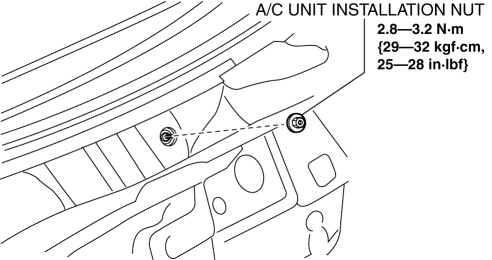
CAUTION:
-
If moisture or foreign material enters the refrigeration cycle, cooling ability will be lowered and abnormal noise or other malfunction could occur. Always plug open fittings immediately after removing any refrigeration cycle parts.
13. Remove the shower ducts.
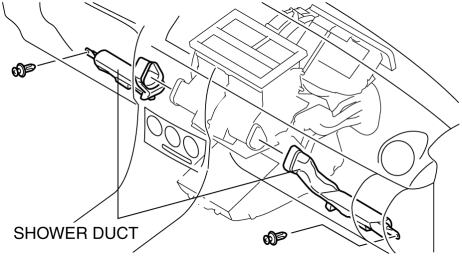
14. Remove the rear heat duct (1)..
15. Remove the heater case.
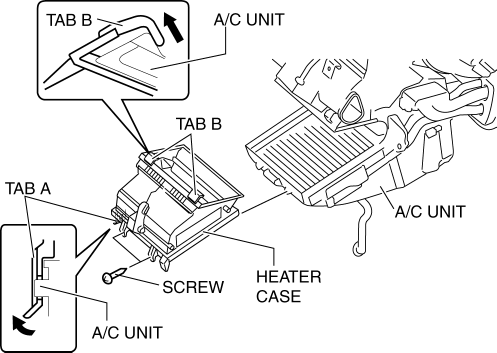
-
Remove the screws.
-
Pull up tab A in the direction shown by the arrow in the figure and remove it from the A/C unit.
-
Pull up tabs B in the direction shown by the arrow in the figure and remove it from the A/C unit.
16. Disconnect the drain hose connected to the A/C unit..
17. Remove the nuts and bolts for installing the dashboard to the body.
18. Remove the dashboard with A/C unit..
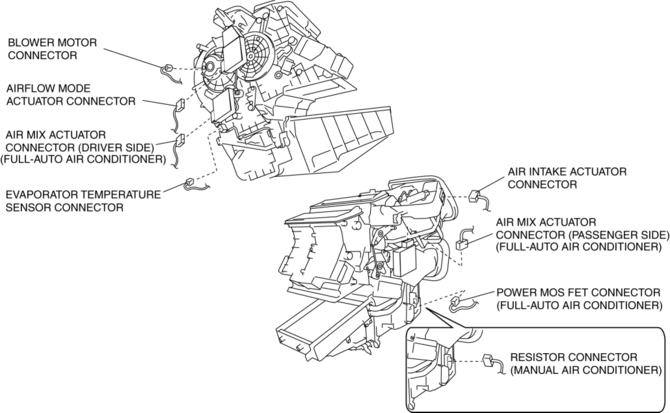
19. Disconnect the following connectors:
-
Blower motor connector
-
Power MOS FET connector (Full-auto air conditioner)
-
Resistor connector (Manual air conditioner)
-
Evaporator temperature sensor connector
-
Air intake actuator connector
-
Air mix actuator connector (Full-auto air conditioner)
-
Airflow mode actuator connector (Full-auto air conditioner)
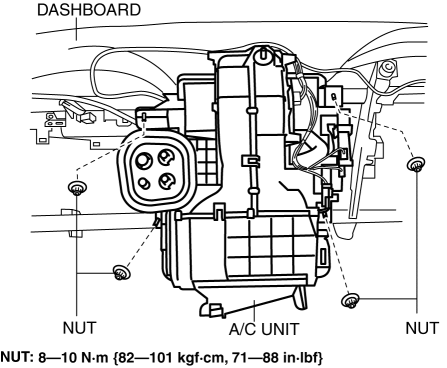
20. Remove the nuts for installing the A/C unit to the dashboard.
21. Install in the reverse order of removal..
22. Inspect for engine coolant leakage..
23. Perform the refrigerant system performance test..
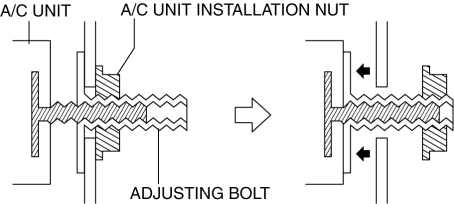
A/C Unit Installation Nut Removal Note
NOTE:
-
If the adjusting bolt rotates when removing the A/C unit nut, keep rotating the nut. The adjusting bolt stops rotating when it contacts the A/C unit and the nut can be removed.
A/C Unit Installation Note
1. When replacing the A/C unit or evaporator, add compressor oil to the refrigerant cycle.
-
Supplemental oil amount (approx. quantity)
-
30 ml {30 cc, 1.0 fl oz}
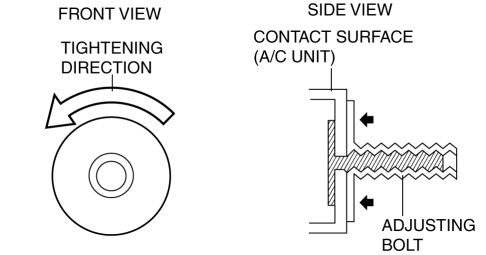
2. Tighten the A/C unit adjusting bolt until it lightly touches the A/C unit.
Drain Hose Installation Note
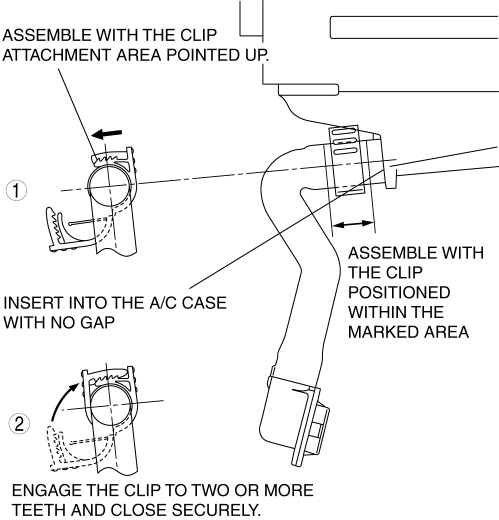
1. Install the clip as shown in the figure.
Heater Hose Removal Note
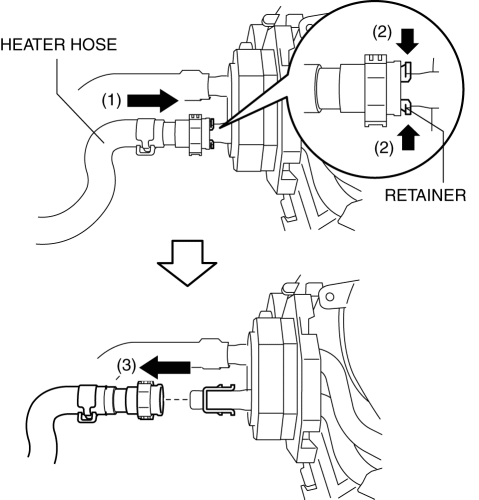
1. While pressing the heater hose into the A/C unit side (1), pinch the quick connector retainer (2), then disconnect the heater hose from the A/C unit (3).
Heater Hose Installation Note
1. Insert the heater hose into the pipe of the A/C unit until a click is heard.
2. While pressing the heater hose quick connector against the A/C unit side, press in the push tab.
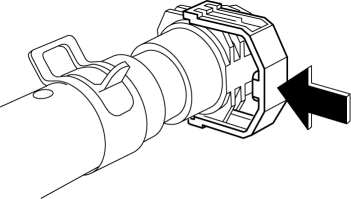
3. Verify that the heater hose cannot be pulled out from the A/C unit by lightly pulling the heater hose.
 A/C Unit Disassembly/Assembly
1. Disassemble in the order indicated in the table.
CAUTION:
If a non-specified grease is used, it may result in abnormal noise or improper
operation of the links. Apply only the specifie ...
 Air Intake Actuator Inspection [Full Auto Air Conditioner]
1. Connect battery positive voltage to air intake actuator terminal B (or C),
connect terminal C (or B) to ground, and then verify that the air intake actuator
operates as shown in the table.
...
Other materials:
Fuel Filler Lid Opener Cable Removal/Installation
4SD
1. Disconnect the negative battery cable..
2. Remove the following parts:
a. Front seat (LH).
b. Front scuff plate (LH).
c. Rear scuff plate.
d. B-pillar lower trim.
e. Rear seat cushion.
f. Rear seat back.
g. Tire house trim.
h. Trunk end trim.
i. Trunk side trim (RH).
j. ...
Antenna Feeder No.5 Removal/Installation
1. Disconnect the negative battery cable..
2. Remove the following parts:
a. Front scuff plate (RH).
b. Front side trim (RH).
c. Rear scuff plate (RH).
d. B-pillar lower trim (RH).
e. Rear seat cushion.
f. Tire house trim (RH).
3. Partially peel back the floor covering.
4. Disconne ...
Fuel Gauge Sender Unit Removal/Installation
MZR 2.0, MZR 2.5
NOTE:
Fuel pump unit cannot be disassembled.
1. Remove the fuel gauge sender unit..
MZR 2.3 DISI Turbo
NOTE:
Fuel pump unit cannot be disassembled.
1. Remove the fuel gauge sender unit..
SKYACTIV-G 2.0
NOTE:
Fuel pump unit cannot be disasse ...
