
Mazda 3 Owners Manual: Adjusting the Vents
Directing airflow
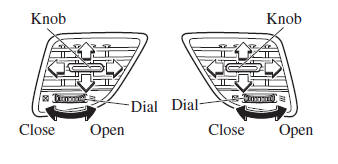
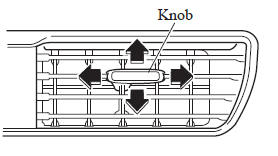
To adjust the direction of airflow, move the adjustment knob.
NOTE
- When using the air conditioner under
humid ambient temperature conditions,
the system may blow fog from the vents.
This is not a sign of trouble but a result of humid air being suddenly cooled.
- The air vents can be fully opened and closed by operating the dial.
Side Vents
Center Vents
 Vent Operation
...
 Selecting the Airflow Mode
Dashboard Vents
Defroster and Floor Vents
Dashboard and Floor Vents
Defroster Vents
Floor Vents
...
Other materials:
Glass Antenna
Purpose, Function
4SD
The AM/FM radio waves and RDS-TMC (Radio Data System-Traffic Message Channel)
radio waves are converted to an electrical signal and the signal is sent to
the audio unit.
5HB (With audio unit (with display))
The RDS-TCM (Radio Data System-Traffic Mes ...
Front Door Latch And Lock Actuator Removal/Installation
1. To access the glass installation bolt, position the front door glass so that
the distance from the top of the front door glass to the upper part of the front
beltline molding is approx. 80 mm {3.1 in}.
2. Disconnect the negative battery cable..
3. Remove the following parts:
a. Inne ...
Operating Tips for MP3
MP3 stands for MPEG Audio Layer 3,
which is standardized voice compression
established by the ISO *1 working group
(MPEG).
Use of MP3 allows for audio data to be
compressed to approximately a tenth of
the source data size.
This unit plays files with the extension
(.mp3) as MP3 files.
...
