
Mazda 3 Service Manual: Input/Turbine Speed Sensor Removal/Installation [FS5 A EL]
CAUTION:
-
Always use a new bolt. If the removed input/turbine speed sensor installation bolt is reused, it may cause oil leakage.
-
A sealant coating is applied to the input/turbine speed sensor installation bolt to prevent oil leakage from the installation bolt hole which passes through the component.
1. Perform the following procedures.
a. Remove the battery cover..
b. Disconnect the negative battery cable.
c. Remove the air cleaner component..
2. Remove in the order indicated in the table.
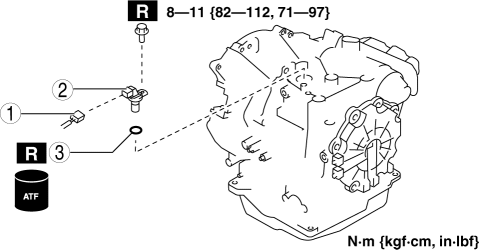
|
1 |
Connector |
|
2 |
Input/turbine speed sensor |
|
3 |
O-ring |
3. Install in the reverse order of removal.
 Input/Turbine Speed Sensor Inspection [FS5 A EL]
CAUTION:
Water or foreign objects entering the connector can cause a poor connection
or corrosion. Be sure not to drop water or foreign objects on the connector
when disconnecting it.
...
 Drivetrain
...
Other materials:
How to Arm the System
Close the windows and the moonroof *
securely.
Switch the ignition OFF.
Make sure the hood, the doors, and the
liftgate/trunk lid are closed.
Press the lock button on the transmitter
or lock the driver's door from the
outside with the auxiliary key.
The hazard warning lights will ...
Cleaning and protecting the vehicle exterior
To preserve the appearance and long-term durability of the Subaru Solterra,
follow these recommended care procedures to keep the exterior in optimal condition:
Cleaning instructions
Start from the upper sections of the Subaru Solterra and gradually work
downward, thoroughly rinsing the bod ...
Power Window Motor Removal/Installation
Front Power Window Motor
1. Fully lower the front door glass.
2. Disconnect the negative battery cable..
3. Remove the inner garnish..
4. Remove the front door trim..
5. Remove the front door speaker..
6. Remove the bolts.
7. Disconnect the front power window motor connector.
...
