
Mazda 3 Service Manual: Input/Turbine Speed Sensor Inspection [FS5 A EL]
CAUTION:
-
Water or foreign objects entering the connector can cause a poor connection or corrosion. Be sure not to drop water or foreign objects on the connector when disconnecting it.
On-Vehicle Inspection
1. Perform the following procedures.
a. Remove the battery cover..
b. Disconnect the negative battery cable.
c. Remove the air cleaner component..
d. Disconnect the input/turbine speed sensor connector.
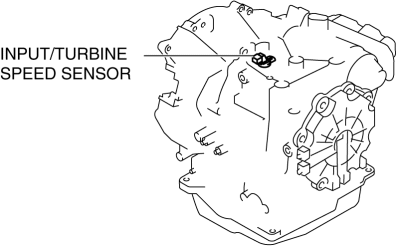
2. Measure the resistance between the input/turbine speed sensor terminals A and B.
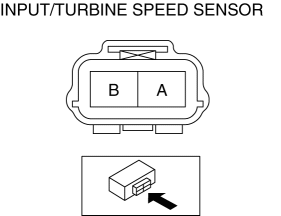
-
If there is any malfunction, replace the input/turbine speed sensor..
-
Input/turbine speed sensor specification
-
250—600 ohms
Off-Vehicle Inspection
1. Measure the resistance between the input/turbine speed sensor terminals A and B.
-
If there is any malfunction, replace the input/turbine speed sensor..
-
Input/turbine speed sensor specification
-
250—600 ohms
 Brake Switch Inspection
CAUTION:
Inspect the brake switch with it installed to the brake pedal, otherwise
the brake switch may not operate normally. If the brake switch is removed from
the brake pedal, replace ...
 Input/Turbine Speed Sensor Removal/Installation [FS5 A EL]
CAUTION:
Always use a new bolt. If the removed input/turbine speed sensor installation
bolt is reused, it may cause oil leakage.
A sealant coating is applied to the input/turbine s ...
Other materials:
Customer Assistance
(Puerto Rico)
Your complete and permanent satisfaction is our business. That is why all
Authorized Mazda
Dealers have the knowledge and the tools to keep your Mazda vehicle in top
condition.
If you have any questions or recommendations for improvement regarding the
service of
your Mazda vehicle or serv ...
Cylinder Head Gasket Replacement [Mzr 2.0, Mzr 2.5]
WARNING:
Fuel vapor is hazardous. It can very easily ignite, causing serious injury
and damage. Always keep sparks and flames away from fuel.
Fuel line spills and leakage are dangerous. Fuel can ignite and cause serious
injuries or death and damage. Fuel can also irritate skin ...
Aerodynamic Under Cover No.1 Removal/Installation
1. Remove the aerodynamic under cover No.2..
2. Peel off the front mudguard..
3. Remove the bolts and fastener.
4. Remove the aerodynamic under cover No.1 in the direction of the arrow shown
in the figure.
CAUTION:
Be careful not to damage the aerodynamic under cover No.1 durin ...
