
Mazda 3 Service Manual: On Board Diagnostic System Simulation Inspection [FS5 A EL]
1. Connect the M-MDS(IDS) to the DLC-2.
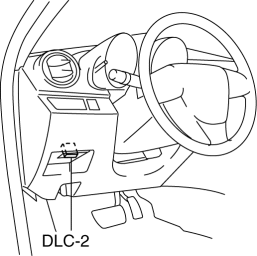
2. After the vehicle is identified, select the following items from the initialization screen of the IDS.
a. Select "DataLogger".
b. Select "Modules".
c. Select "TCM".
3. Select the simulation items from the PID table.
4. Perform the active command modes function, inspect the operations for each parts.
-
If the operation of output parts cannot be verified after the active command mode inspection is performed, this could indicate the possibility of an open or short circuit, sticking, or operation malfunction in the output parts.
|
Item |
Related to |
Unit/Condition |
Test condition |
|
LPS |
Pressure control solenoid A |
A |
Idling at P or N position |
|
LPSB |
Pressure control solenoid B |
% |
Idling at P or N position |
|
SSA/SS1 |
Shift solenoid A |
% |
Idling at P or N position |
|
SSB/SS2 |
Shift solenoid B |
% |
Idling at P or N position |
|
SSC/SS3 |
Shift solenoid C |
% |
Idling at P or N position |
|
SSD/SS4 |
Shift solenoid D |
On/Off |
Idling at P or N position |
|
SSE_SS5 |
Shift solenoid E |
On/Off |
Idling at P or N position |
|
SSF_SS6 |
Shift solenoid F |
On/Off |
Idling at P or N position |
 On Board Diagnostic System PID/Data Monitor Inspection [Fw6 A EL]
1. Connect the M-MDS (IDS) to the DLC-2.
2. After the vehicle is identified, select the following items from the initialization
screen of the IDS.
a. Select “DataLogger”.
b. Select “ ...
 On Board Diagnostic System Simulation Inspection [Fw6 A EL]
1. Connect the M-MDS (IDS) to the DLC-2.
2. After the vehicle is identified, select the following items from the initialization
screen of the IDS.
a. Select “DataLogger”.
b. Select “ ...
Other materials:
Service Cautions
Injury/damage Prevention Precautions
Depending on the vehicle, the cooling fan may operate suddenly even when
the ignition is switched to off. Therefore, keep hands and tools away from the
cooling fan even if the cooling fan is not operating to prevent injury to personnel
or damage t ...
Wastegate Control Solenoid Valve Inspection [Mzr 2.3 Disi Turbo]
Airflow Inspection
1. Remove the battery cover..
2. Disconnect the negative battery cable..
3. Remove the wastegate control solenoid valve..
4. Inspect the airflow between the ports under the following conditions.
If not as specified, replace the wastegate control solenoid val ...
Audio Operation Using Voice Recognition (Type B)
Main audio operation
The below commands are examples of the available commands.
When the talk button is pressed and the following command is spoken out, the
audio can be
operated. The commands in the () can be omitted. The specified name and number
are put
into the {}.
NOTE
Some c ...
