
Mazda 3 Service Manual: Thermostat Removal/Installation [Mzr 2.0, Mzr 2.5]
WARNING:
-
Never remove the cooling system cap or loosen the radiator drain plug while the engine is running, or when the engine and radiator are hot. Scalding engine coolant and steam may shoot out and cause serious injury. It may also damage the engine and cooling system.
-
Turn off the engine and wait until it is cool. Even then, be very careful when removing the cap. Wrap a thick cloth around it and slowly turn it counterclockwise 2.5 turns. Step back while the pressure escapes.
-
When you are sure all the pressure is gone, turn the cap using the cloth, and remove it.
1. Remove the battery cover..
2. Disconnect the negative battery cable..
3. Remove the plug hole plate..
4. Remove the aerodynamic under cover No.2 and splash shield as a single unit..
5. Drain the engine coolant..
6. Remove the generator drive belt with the A/C drive belt still installed and set it out of the way. (MZR 2.0).
7. Remove the drive belt. (MZR 2.5).
8. Remove the drive belt auto tensioner. (MZR 2.0).
9. Remove the idler pulley. (MZR 2.5).
10. Remove in the order indicated in the table.
11. Install in the reverse order of removal.
12. Refill the engine coolant..
13. Inspect for engine coolant leakage..
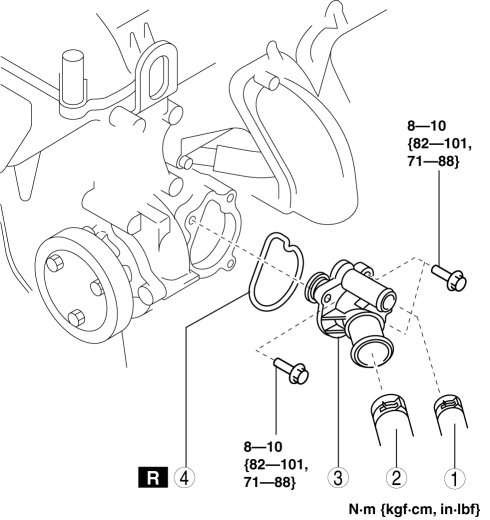
|
1 |
Water hose |
|
2 |
Lower radiator hose |
|
3 |
Thermostat component |
|
4 |
Gasket |
 Thermostat Inspection [Mzr 2.0, Mzr 2.5]
1. Remove the thermostat..
2. Visually check that the thermostat valve is closed.
3. Place the thermostat in water.
WARNING:
During inspection, the thermostat and water are extremely hot ...
 Emissions
...
Other materials:
Electric Power Steering Oil Pump Component Disassembly/Assembly
CAUTION:
The internal parts of the EHPAS control module and motor could be damaged
if they receive an impact. Be careful when handling the EHPAS control module
and motor to prevent the component from getting hit. Replace the electric power
steering oil pump component if it has recei ...
Antenna Feeder No.7 Inspection
1. Disconnect the negative battery cable..
2. Remove the liftgate upper trim..
3. Disconnect the connector A and B..
4. Verify that the continuity between antenna feeder No.7 terminals is as indicated
in the table.
If not as indicated in the table, replace antenna feeder No.7.
...
Fuel Pump Control Module Inspection [Skyactiv G 2.0]
1. Perform the KOEO self-test..
2. Verify that a fuel pump control module related DTC is detected..
If DTCs are detected, repair the malfunctioning part according to the applicable
DTC troubleshooting..
If a DTC is not detected, go to the next step.
3. Inspect the followin ...
