
Mazda 3 Service Manual: Ambient Temperature Sensor Removal/Installation [Manual Air Conditioner]
1. Disconnect the negative battery cable..
2. Remove the aerodynamic under cover No.2..
3. Remove the aerodynamic under cover No.1..
4. Disconnect the connector.
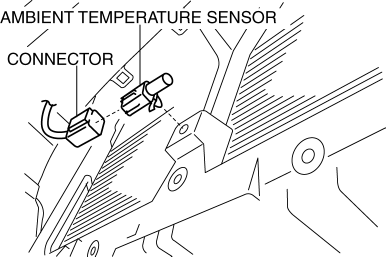
5. Remove the ambient temperature sensor.
6. Install in the reverse order of removal.
 Ambient Temperature Sensor Removal/Installation [Full Auto Air Conditioner]
1. Disconnect the negative battery cable..
2. Remove the aerodynamic under cover No.2..
3. Remove the aerodynamic under cover No.1..
4. Disconnect the connector.
5. Remove the ambient temp ...
 Boost Air Temperature Sensor Inspection [Mzr 2.3 Disi Turbo]
Resistance Inspection
NOTE:
Because the boost air temperature sensor is integrated in the MAP sensor,
replacing the boost air temperature sensor includes replacement of the MAP sensor/boos ...
Other materials:
Seat Belt Inspection
Belt
1. Verify that the belt is installed properly with no twists or kinks.
2. Verify that there is no damage to the seat belt and no deformation of the
metal fittings.
If there is any malfunction, replace the seat belt.
ELR
Except 5HB (rear center seat belt)
1. Verify tha ...
Headlight Aiming
CAUTION:
If the headlight aiming is adjusted with cargo in the vehicle, it may not
adjust correctly. Adjust the headlight aiming with the vehicle under the following
conditions:
No occupants inside vehicle
Cargo other than spare tire, jack, and tools not loaded
...
Floor Covering Removal/Installation
1. Disconnect the negative battery cable..
2. Remove the following parts:
a. Front seat.
b. Audio amplifier (Vehicles with Bose®).
c. Front scuff plate.
d. Joint cover.
e. Front side trim.
f. Fuel-filler lid opener lever bezel.
g. Selector lever knob (ATX).
h. Shift lever knob (MT ...
