
Mazda 3 Service Manual: Auto Leveling Sensor Inspection
1. Disconnect the negative battery cable..
2. Remove the auto leveling sensor..
3. Connect the three dry cell batteries (1.5 V) in a series.
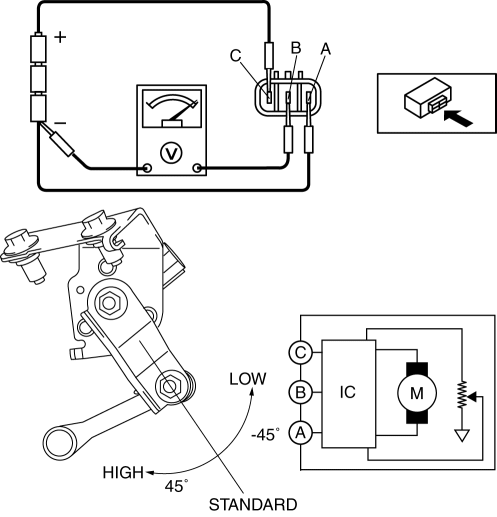
4. Connect auto leveling sensor terminal A to the battery’s minus terminal, and terminal C to the battery’s plus terminal, and apply 4.5 V of voltage between terminals A and C.
5. Connect the tester as shown in the figure.
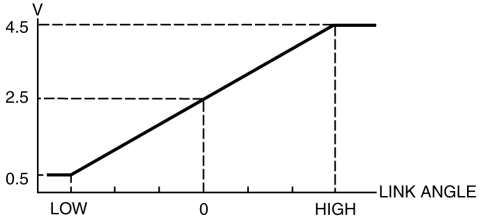
6. When slowly moving the link up and down, verify that the shift is linear while the voltage is 0.5 to 4.5 V.
-
If the voltage cannot be verified as indicated in the graph, replace the auto leveling sensor.
 General
...
 Auto Leveling Sensor Removal/Installation
1. Disconnect the negative battery cable..
2. Lift up the vehicle.
3. Disconnect the quick release connector. (charcoal canister side).
4. Remove in the order indicated in the table.
...
Other materials:
B Pillar Upper Trim Removal/Installation
1. Remove the following parts:
a. Adjuster anchor cover.
b. Upper anchor installation bolts on the front seat belt.
c. Front scuff plate.
d. Rear scuff plate.
2. Partially peel back the seaming welt.
3. Remove the B-pillar lower trim..
4. Grasp the lower end of the B-pillar upper trim, ...
Clutch Fluid Leakage Inspection [C66 M R]
CAUTION:
Do not allow clutch fluid get on a painted surface. Clutch fluid contains
properties which can dissolve the paint. If clutch fluid gets on a painted surface,
wash it off with water immediately and wipe the area off completely.
1. Pump the clutch pedal a few times.
2. I ...
Key Reminder Switch Inspection
1. Disconnect the negative battery cable. (See BATTERY REMOVAL/INSTALLATION [MZR
2.0, MZR 2.5].)(See BATTERY REMOVAL/INSTALLATION [MZR 2.3 DISI Turbo].)(See BATTERY
REMOVAL/INSTALLATION [SKYACTIV-G 2.0].)
2. Remove the column cover. (See COLUMN COVER REMOVAL/INSTALLATION.)
3. Disconnect the ...
