
Mazda 3 Service Manual: Base Installation
1. Cut away all of the original sealant using a razor.
WARNING:
-
Using a razor with bare hands can cause injury. Always wear gloves when using a razor.
2. Clean and degrease the ceramic coating on the glass and the base.
CAUTION:
-
Keep the area free of dirt and grease, and do not touch the surface. Otherwise, the primer may not properly bond to the surface of the glass.
3. Apply primer to the bonding area of the glass and the base.
4. Use only glass primer on the glass, and body primer on the base. Allow the primer to dry for approx. 30 min.
5. Apply 3.0 mm {0.12 in}
layer of sealant to the base.
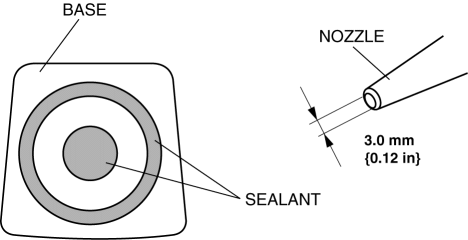
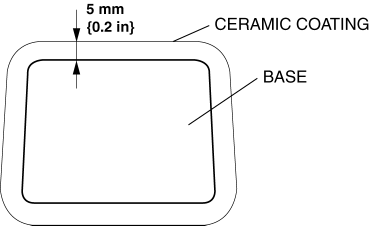
6. Center the base in the ceramic coating and press it onto the glass.
7. Use isopropyl alcohol to remove any excess repair sealant. Hardening time of sealant
|
Temperature |
Surface hardening time |
Time required until car can be put into service |
|
5 °C {41 °F} |
Approx. 1.5 h |
Approx. 12 h |
|
20 °C {68 °F} |
Approx. 1 h |
Approx. 4 h |
|
35 °C {95 °F} |
Approx. 10 min |
Approx. 2 h |
8. Install the rearview mirror.
9. Connect the negative battery cable..
 Auto Dimming Mirror Removal
1. Disconnect the negative battery cable.
2. Remove the screw.
3. Disconnect the auto-dimming mirror connector.
4. Pull out the rearview mirror toward the vehicle rear.
CAUTION:
...
 Base Removal
1. Remove the rearview mirror..
2. Wind each end of a wire around a bar.
WARNING:
Using the piano wire with bare hands can cause injury. Always wear gloves
when using the piano wire ...
Other materials:
Front Outer Handle Removal/Installation
1. To access the glass installation bolt, position the front door glass so that
the distance from the top of the front door glass to the upper part of the front
beltline molding is approx. 80 mm {3.1 in}.
2. Disconnect the negative battery cable..
3. Remove the following parts:
a. Inne ...
Air Intake Actuator Removal/Installation [Full Auto Air Conditioner]
1. Set the air intake mode to FRESH.
2. Disconnect the negative battery cable..
3. Remove the following parts:
a. Front scuff plate (Passenger-side).
b. Front side trim (Passenger-side).
c. Dashboard under cover.
d. Glove compartment.
e. Lower panel (Passenger-side).
f. Shower duct ( ...
Intake Air Temperature (Iat) Sensor Inspection [Mzr 2.0, Mzr 2.5]
Resistance Inspection
NOTE:
Because the IAT sensor is integrated in the MAF sensor, replacing the IAT
sensor includes replacement of the MAF/IAT sensor.
1. Remove the battery cover..
2. Disconnect the negative battery cable..
3. Disconnect the MAF/IAT sensor connector.
4. Mea ...
