
Mazda 3 Service Manual: Combination Switch Removal/Installation
CAUTION:
-
Handling the air bag module improperly can accidentally deploy the air bag module, which may seriously injure you. Read the air bag system service warnings and cautions before handling the air bag module..
1. Switch the ignition to off.
2. Disconnect the negative battery cable and wait for 1 min or more.
.
3. Remove the following parts:
a. Driver-side air bag module.
b. Steering wheel.
c. Column cover.
d. Clock spring.
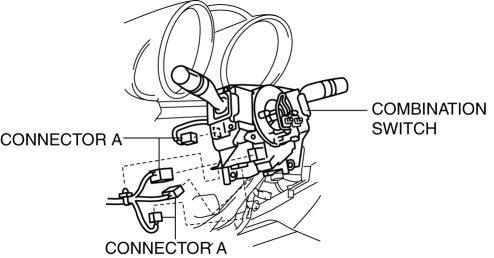
4. Disconnect the connector A.
5. Disconnect the connector B.
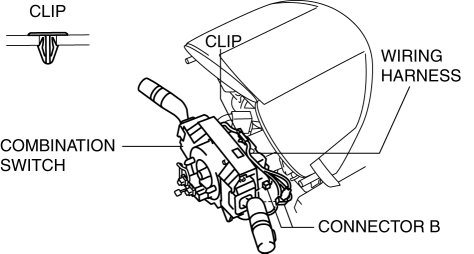
6. Detach the clips and set the wiring harness aside.
7. Remove the screws.

8. Remove the combination switch.
9. Install in the reverse order of removal.
 Combination Switch Disassembly/Assembly
CAUTION:
Handling the air bag module improperly can accidentally deploy the air bag
module, which may seriously injure you. Read the air bag system service warnings
and cautions before h ...
 No.6 Bsm Indicator Light Flashes While Not Under Bsm Indicator Light Flashing
Conditions (No Combination Switch Operation (Turn Signal Switch)) [Blind Spot Monitoring
(Bsm)]
No.6 Bsm Indicator Light Flashes While Not Under Bsm Indicator Light Flashing
Conditions (No Combination Switch Operation (Turn Signal Switch)) [Blind Spot Monitoring
(Bsm)]
6
BSM indicator light flashes while not under BSM indicator light-flashing
conditions (no combination switch operation (turn signal switch)
Description
...
Other materials:
Using the interior lights
Interior lights list
Location of the interior lights
Outer foot lights (if equipped)
Inside door handle lights (if equipped)
Rear interior light
Footwell lights (if equipped)
Front interior lights/personal lights
Shift lights
Auxiliary box lights (if equipped)/Wireless charge ...
Brake/Taillight Bulb Removal/Installation
4SD
1. Disconnect the negative battery cable..
2. Remove the following parts:
a. Trunk mat.
b. Trunk board.
c. Trunk end trim.
3. Partially peel back the trunk side trim..
4. Remove in the order indicated in the table.
1
Connector
2
...
Locking, Unlocking with Request
Switch (With the advanced keyless
function)
All doors and the liftgate can be locked/
unlocked by pressing the request switch
on the front doors while the key is being
carried.
(5–door)
The request switch on the liftgate can only
be used to lock all doors and the liftgate.
Front doors
Liftgate (5-door Lock only)
To lock
To ...
