
Mazda 3 Service Manual: Cooling System Cap Inspection [Mzr 2.0, Mzr 2.5]
WARNING:
-
Never remove the cooling system cap or loosen the radiator drain plug while the engine is running, or when the engine and radiator are hot. Scalding engine coolant and steam may shoot out and cause serious injury. It may also damage the engine and cooling system.
-
Turn off the engine and wait until it is cool. Even then, be very careful when removing the cap. Wrap a thick cloth around it and slowly turn it counterclockwise 2.5 turns. Step back while the pressure escapes.
-
When you are sure all the pressure is gone, turn the cap using the cloth, and remove it.
1. Clean the cooling system cap and the sealed part.
2. Inspect the cooling system cap for cracks or everted seal.
-
If there is any malfunction, replace the cooling system cap.
3. Attach the cooling system cap to the SST
or aftermarket equivalent and a radiator cap tester.
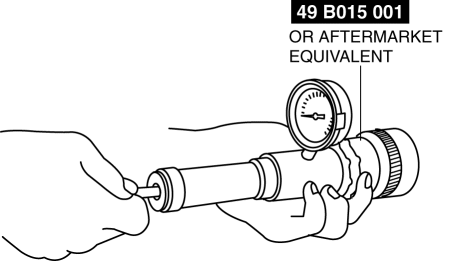
4. Hold the cooling system cap downward and apply pressure gradually. Verify that the pressure is held stable for 10 s.
-
If the pressure is not held stable, replace the cooling system cap.
-
Cooling system cap valve opening pressure
-
135—155 kPa {1.38—1.58 kgf/cm2, 19.6—22.4 psi}
 Cooling Fan Component Removal/Installation [Mzr 2.0, Mzr 2.5]
WARNING:
Never remove the cooling system cap or loosen the radiator drain plug while
the engine is running, or when the engine and radiator are hot. Scalding engine
coolant and steam may ...
 Cooling System Service Warnings [Mzr 2.0, Mzr 2.5]
WARNING:
Never remove the cooling system cap or loosen the radiator drain plug while
the engine is running, or when the engine and radiator are hot. Scalding engine
coolant and steam may ...
Other materials:
Rear Lower Arm Removal/Installation
1. Disconnect the auto leveling sensor link lower side. (Vehicles with AFS).
2. Remove in the order indicated in the table.
3. Install in the reverse order of removal.
4. Inspect the wheel alignment and adjust it if necessary..
1
Rear coil spring component
.
...
Front Passenger Occupant Classification System
First, please read "Supplemental Restraint System (SRS) Precautions"
carefully.
Front Passenger Seat Weight Sensor
Your vehicle is equipped with a front passenger seat weight sensors as a part
of the
supplemental restraint system. These sensors are located under both of the front
p ...
Neutral Switch Removal/Installation [A26 M R]
1. Disconnect the negative battery cable.
2. Disconnect the neutral switch connector.
3. Remove the aerodynamic under cover No.2..
4. Remove the neutral switch with the gasket.
5. Install a new gasket and the neutral switch to the transaxle case.
Tightening torque
29—39 N·m ...
