
Mazda 3 Service Manual: Dashboard Upper Panel Removal/Installation
Vehicles Without Bose®
1. Disconnect the negative battery cable..
2. Remove the following parts:
a. Upper column cover.
b. Instrument cluster.
c. Center panel.
d. Center cover.
3. Remove the screw.
4. Pull up the dashboard upper panel in the direction of arrow shown in the figure, then remove the clips.
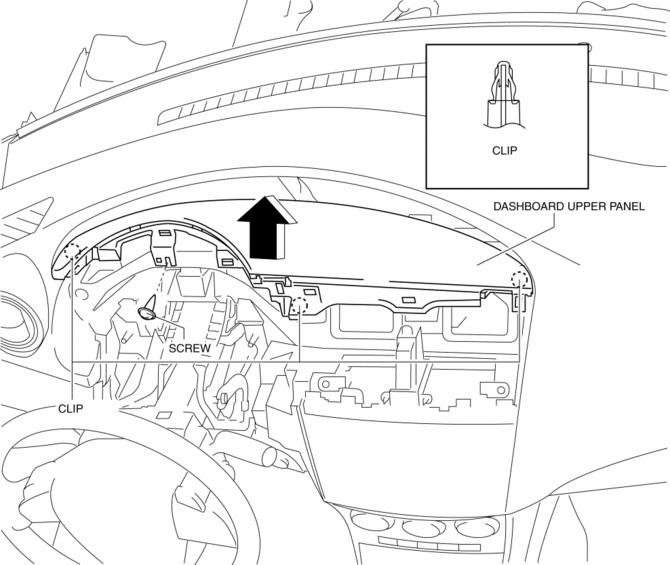
5. Pull up the dashboard upper panel in the direction of arrow shown in the figure, then remove the clips.
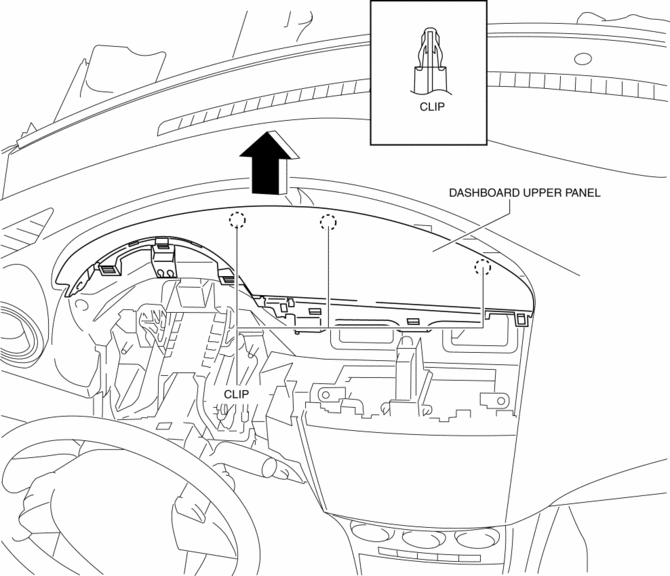
6. Remove the dashboard upper panel.
7. Install in the reverse order of removal.
Vehicles With Bose®
1. Disconnect the negative battery cable..
2. Remove the following parts:
a. Upper column cover.
b. Instrument cluster.
c. Center panel.
d. Center cover.
3. Remove the screw.
4. Pull up the dashboard upper panel in the direction of arrow shown in the figure, then remove the clips.
5. Pull up the dashboard upper panel in the direction of arrow shown in the figure, then remove the clips.
6. Remove the dashboard upper panel.
7. Disconnect the center speaker connector.
8. Disconnect the microphone connector.
9. Remove the screws then remove the dashboard upper panel No.2 from the dashboard upper panel No.1.
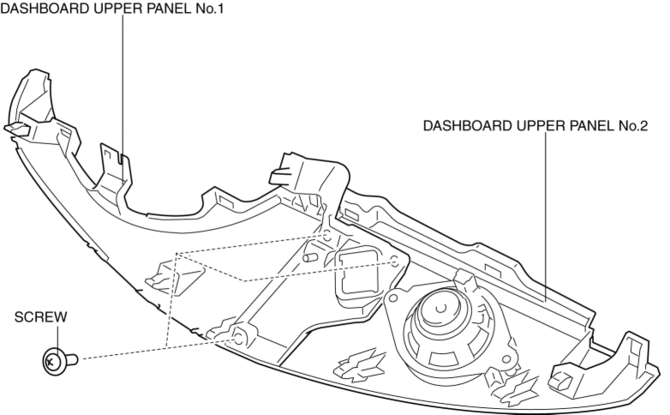
10. Install in the reverse order of removal.
 Dashboard Under Cover Removal/Installation
1. Detach the hooks in the direction of arrow (1) shown in the figure.
2. Pull the dashboard under cover in the direction of arrow (2).
3. Remove the dashboard under cover, then remove the gui ...
 Decoration Panel Removal/Installation
1. Remove the following parts:
a. Passenger-side front scuff plate.
b. Passenger-side front side trim.
c. Glove compartment.
d. Passenger-side lower panel.
2. Remove the screw.
3. Pull the ...
Other materials:
Electric Power Steering Oil Pump Component Disassembly/Assembly
CAUTION:
The internal parts of the EHPAS control module and motor could be damaged
if they receive an impact. Be careful when handling the EHPAS control module
and motor to prevent the component from getting hit. Replace the electric power
steering oil pump component if it has recei ...
Charcoal Canister Removal/Installation [Mzr 2.0, Mzr 2.5]
Except for Mexico
1. Remove in the order indicated in the table.
1
Evaporative hose
2
Quick release connector
(See QUICK RELEASE CONNECTOR (EMISSION SYSTEM) REMOVAL/INSTALLATION [MZR
2.0, MZR 2.5].)
3
Charc ...
Seat Weight Sensor Inspection [Two Step Deployment Control System]
CAUTION:
If any of the following work is performed, perform the seat weight sensor
inspection using the M-MDS.
Removal of the passenger-side seat
Loosening and retightening of passenger’s seat fixing bolts
Or, the vehicle is involved in a collision
...
