
Mazda 3 Service Manual: Dashboard Under Cover Removal/Installation
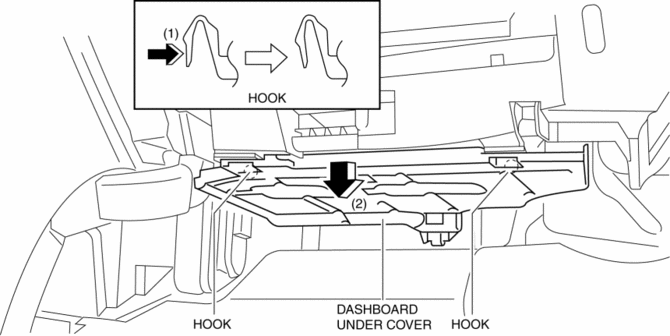
1. Detach the hooks in the direction of arrow (1) shown in the figure.
2. Pull the dashboard under cover in the direction of arrow (2).
3. Remove the dashboard under cover, then remove the guide.
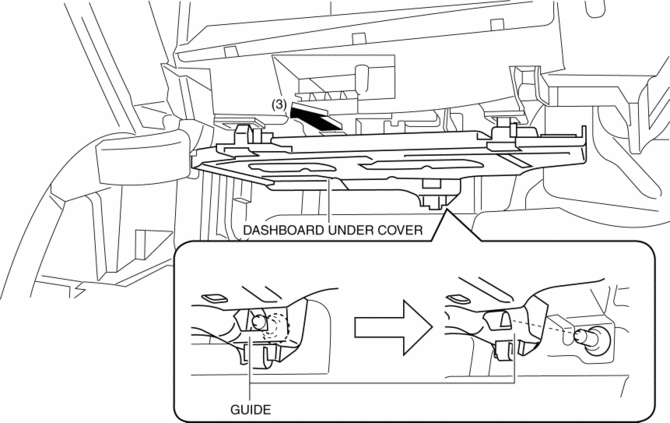
4. Install in the reverse order of removal.
 Dashboard Removal/Installation
1. Set the air intake mode to FRESH.
2. Set the air mix mode to MAX COLD.
3. Disconnect the negative battery cable..
4. Remove the following parts:
a. Front doors.
b. Front scuff plate.
c. ...
 Dashboard Upper Panel Removal/Installation
Vehicles Without Bose®
1. Disconnect the negative battery cable..
2. Remove the following parts:
a. Upper column cover.
b. Instrument cluster.
c. Center panel.
d. Center cover.
3. Remove ...
Other materials:
Warning Lights
These lights turn on or flash to notify the user of the system operation
status or a system
malfunction.
Signal
Warning Lights
Master Warning Light *1
Brake System Warning Light *1*2
ABS Warning Light *1
Charging System Warnin ...
Steering Wheel And Column Removal/Installation [With Advanced Keyless Entry
And Push Button Start System]
WARNING:
Handling the air bag module improperly can accidentally operate (deploy)
the air bag module, which may seriously injure you. Read the service warnings
before handling the air bag module..
1. Remove the driver-side front scuff plate..
2. Remove the driver-side front sid ...
Air Intake Actuator Removal/Installation [Full Auto Air Conditioner]
1. Set the air intake mode to FRESH.
2. Disconnect the negative battery cable..
3. Remove the following parts:
a. Front scuff plate (Passenger-side).
b. Front side trim (Passenger-side).
c. Dashboard under cover.
d. Glove compartment.
e. Lower panel (Passenger-side).
f. Shower duct ( ...
