
Mazda 3 Service Manual: Drive Belt Removal/Installation [Mzr 2.3 Disi Turbo]
1. Remove the aerodynamic under cover No.2 and splash shield as a single unit..
2. Rotate the drive belt auto tensioner in the direction shown in the figure and remove the drive belt.
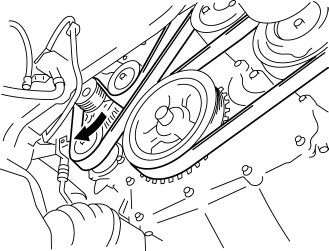
3. Install the drive belt.
4. Verify that the drive belt auto tensioner indicator mark does not exceed the limit..
5. Install the aerodynamic under cover No.2 and splash shield as a single unit..
 Drive Belt Removal/Installation [Mzr 2.0, Mzr 2.5]
MZR 2.0
A/C drive belt removal
1. Remove the aerodynamic under cover No.2 and splash shield as a single unit..
2. Remove the nut shown in the figure and set the power steering pipe component
ou ...
 Drive Belt Removal/Installation [Skyactiv G 2.0]
WARNING:
A hot engine can cause severe burns. Turn off the engine and wait until it
is cool before servicing.
NOTE:
Remove/install the drive belt from the underside of the veh ...
Other materials:
Opening the Hood
With the vehicle parked, pull the
release handle to unlock the hood.
Insert your hand into the hood opening,
slide the latch lever to the right, and lift
up the hood.
NOTE
The lever is located a little to the left of
center when facing the vehicle.
Grasp the support r ...
Tire rotation
To maintain balanced performance and ensure even wear across all wheels, rotate
the tires of your Subaru Solterra according to the recommended pattern illustrated
below.
Regular tire rotation on the Subaru Solterra helps extend overall tire lifespan,
improve handling stability, and maintain o ...
Power Steering Fluid Line Component Removal/Installation
NOTE:
The following procedure is for replacement of the parts shown in the figure.
Regarding replacement of the suction hose and return hose, refer to the electric
power steering oil pump component removal/installation..
Power Steering Pipe Component Removal/Installation
NOT ...
