
Mazda 3 Service Manual: Front Scuff Plate Removal/Installation
1. Detach tab A while pulling the front scuff plate in the direction of the arrow (1) shown in the figure, then detach hook B, clips C, and pins D while pulling in the direction of the arrow (2).
2. Detach tab E while pulling the front scuff plate in the direction of the arrow (3) shown in the figure, pull the front scuff plate in the direction of the arrow (4), and remove it while detaching hook F.
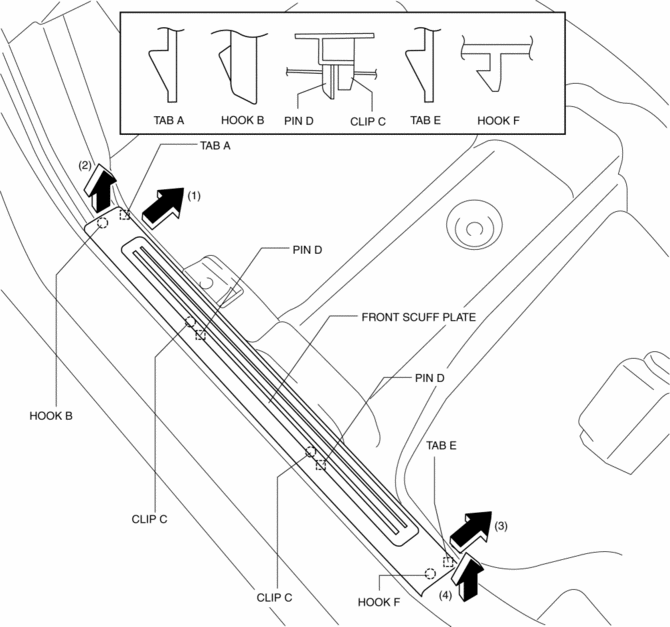
3. Remove the front scuff plate.
4. Install in the reverse order of removal.
 Floor Covering Removal/Installation
1. Disconnect the negative battery cable..
2. Remove the following parts:
a. Front seat.
b. Audio amplifier (Vehicles with Bose®).
c. Front scuff plate.
d. Joint cover.
e. Front side trim ...
 Front Side Trim Removal/Installation
1. Remove the front scuff plate..
2. Partially peel back the seaming welt.
3. Remove the fastener.
4. Pull the front side trim in the direction of the arrow and detach the clip.
5. Instal ...
Other materials:
Headlight aim
Vertical movement adjusting bolts
Adjustment bolt A
Adjustment bolt B
Before checking the headlight aim
Park your Subaru Solterra on a flat, level surface.
Ensure all tires are inflated to the recommended pressure.
Have a person seated in the driver’s seat to simulate normal ...
Body Control Module (Bcm) Removal/Installation
CAUTION:
When replacing the BCM, the configuration procedure must be performed before
removing the BCM. Replacing the BCM without performing the configuration procedure
will result in system malfunction.
ATX
1. Perform the BCM configuration when replacing it..
2. Disconnect t ...
Washer Motor Inspection
1. Disconnect the negative battery cable..
2. Remove the front mudguard (RH)..
3. Disconnect the washer motor connector.
4. After connecting washer motor terminal A to the positive battery terminal,
and terminal B to the negative battery terminal, verify that washer fluid flows
to the wind ...
