
Mazda 3 Service Manual: Car Navigation System
Outline
-
The car-navigation system displays point-of-origin and road guidance maps via the audio unit display and provides guidance and information to the desired point of destination.
NOTE:
-
For the car-navigation system operation, refer to the owner's manual.
-
A TomTom car-navigation unit has been adopted.
Function
Navigation function
-
Calculates route to destination, and provides guidance using the settings made by the user.
-
The navigation system is a hybrid-type system which combines independent navigation and satellite navigation to provide highly accurate detection of the current position based on specialized map matching which identifies the current position by comparing the map information data read from the navigation map data on the SD card with the current position measured by the independent navigation and satellite navigation systems.
Map matching
-
Map matching compares the road configurations of the map information data stored in the SD based on the current position information measured from independent navigation and satellite navigation, and corrects the current position to the most suitable map information data on the route.
Guidance
-
Display guidance
-
The remaining distance to destination, branch points, and road names are indicated on the display.
-
Voice guidance
-
Voice guidance is provided for destination, distance to branch point and heading. The voice guidance is output from the speakers equipped on the vehicle.
Structural view
-
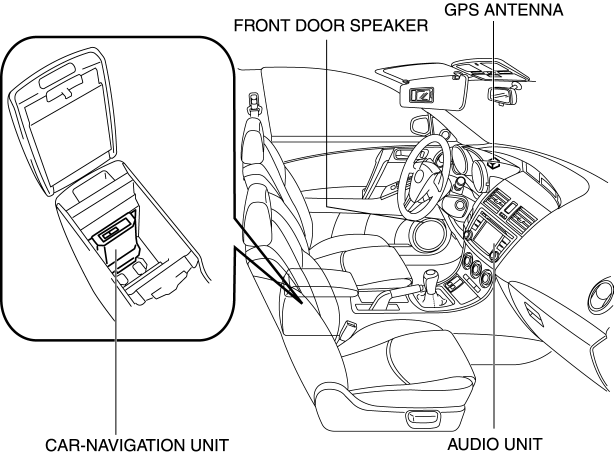
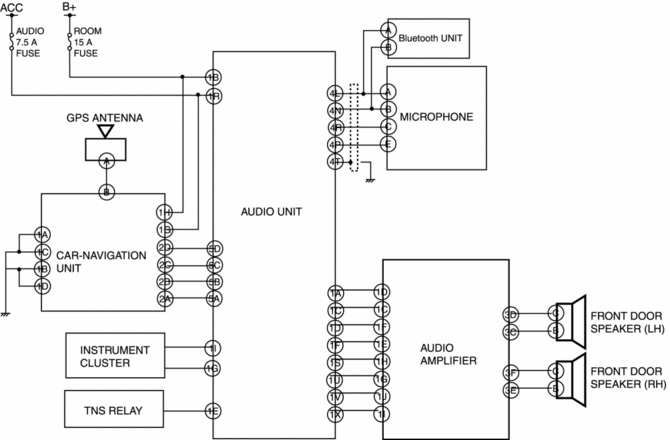
The car-navigation system consists of the car-navigation unit, audio unit, GPS antenna, microphone, and speakers.
Block diagram
Operation
-
Reads the SD card map data inserted into the car-navigation unit and sends the read data to the audio unit.
-
When the audio unit NAV switch is pressed, the system switches to NAVI mode and the navigation screen is displayed in the audio unit display.
-
The car-navigation unit is a hybrid-type system which combines independent navigation with satellite navigation, calculates position information and route and arrival time to the destination, and displays it in the audio unit display.
NOTE:
-
For details on the car-navigation system, refer to the owner's manual.
 Navigation
...
 Car Navigation Unit
Purpose
Reads the SD card data inserted into the car-navigation unit and sends the
read data to the audio unit.
Function
The car-navigation unit has the following functions:
...
Other materials:
Fuel Injector Removal/Installation [Mzr 2.0, Mzr 2.5]
WARNING:
Fuel is very flammable liquid. If fuel spills or leaks from the pressurized
fuel system, it will cause serious injury or death and facility breakage. Fuel
can also irritate skin and eyes. To prevent this, always complete the “Fuel
Line Safety Procedure”, while referring ...
Joint Shaft Assembly [Mzr 2.5 (ATX)]
1. Assemble in the order indicated in the table.
1
Bracket
2
Bearing
.
3
Dust seal (RH)
.
4
Dust seal (LH)
.
5
Joint shaft
.
Bearing A ...
Transaxle Oil Inspection [G66 M R]
1. Park the vehicle on level ground.
2. Remove the aerodynamic under cover No.2..
3. Remove the oil level plug and washer.
4. Verify that the oil is near the brim of the plug port.
If the oil level is lower than the low level, add the specified amount and
type of oil through the ...
