
Mazda 3 Service Manual: Fuel Gauge Sender Unit Inspection
MZR 2.3 DISI Turbo, SKYACTIV-G 2.0
NOTE:
-
The fuel gauge sender unit is integrated with the fuel pump unit.
1. Disconnect the negative battery cable..
2. Remove the rear seat cushion..
3. Remove the fuel pump unit..
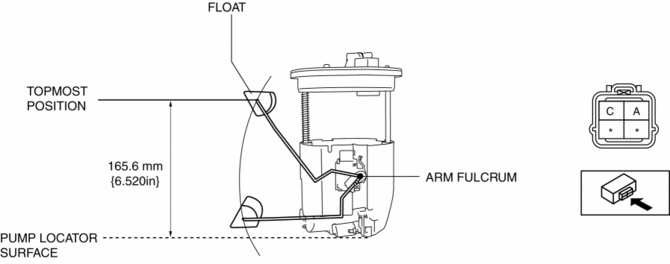
4. Verify that the resistance between terminals A and C of the fuel gauge sender unit based on the height of the float as shown in the figure.
-
If they are not as shown in the figure, replace the fuel pump unit.
|
Float height (mm {in}) |
Resistance (ohms) |
|
165.6 {6.520} |
9.5—12.5 |
|
159.3 {6.272} |
20.0 |
|
130.1 {5.122} |
109.4 |
|
91.3 {3.59} |
194.8—222.2 |
|
52.2 {2.06} |
307.6 |
|
25.7 {1.01} |
400.0 |
|
20.0 {0.787} |
414.5—405.5 |
MZR 2.0, MZR 2.5
NOTE:
-
The fuel gauge sender unit is integrated with the fuel pump unit.
1. Disconnect the negative battery cable..
2. Remove the rear seat cushion..
3. Remove the fuel pump unit..
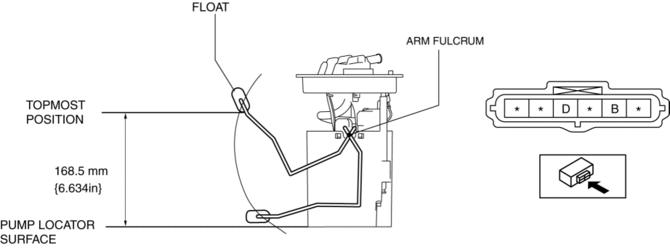
4. Verify that the resistance between terminals B and D of the fuel gauge sender unit based on the height of the float as shown in the figure.
-
If they are not as shown in the figure, replace the fuel pump unit.
|
Float height (mm {in}) |
Resistance (ohms) |
|
168.5 {6.634} |
18—22 |
|
130.1 {5.122} |
107.2—111.6 |
|
91.3 {3.59} |
206—211 |
|
52.2 {2.06} |
304.6—310.6 |
|
40.6 {1.60} |
333.5—339.5 |
|
12.1 {0.476} |
396.8—403.2 |
 Air Bleeding
CAUTION:
If the strainer is removed, impurities may penetrate the power steering system
and damage it. To prevent this, always bleed air with the strainer installed.
Do not ma ...
 Fuel Gauge Sender Unit Removal/Installation
MZR 2.0, MZR 2.5
NOTE:
Fuel pump unit cannot be disassembled.
1. Remove the fuel gauge sender unit..
MZR 2.3 DISI Turbo
NOTE:
Fuel pump unit cannot be disassembled.
1. ...
Other materials:
Battery Replacement
If the buttons on the transmitter are
inoperable and the operation indicator
light does not flash, the battery may be
dead.
Replace with a new battery before the
transmitter becomes unusable.
CAUTION
Make sure the battery is installed
correctly. Battery leakage could occur if ...
Rear ABS Wheel Speed Sensor Removal/Installation
1. Remove the under cover..
2. Remove in the order indicated in the table.
3. Install in the reverse order of removal.
1
Connector
2
Bolt
3
Rear ABS wheel-speed sensor
4
ABS hole cov ...
Fuel Pump Unit Removal/Installation [Mzr 2.0, Mzr 2.5]
WARNING:
Fuel is very flammable liquid. If fuel spills or leaks from the pressurized
fuel system, it will cause serious injury or death and facility breakage. Fuel
can also irritate skin and eyes. To prevent this, always complete the “Fuel
Line Safety Procedure”, while referring ...
