
Mazda 3 Service Manual: Glove Compartment Removal/Installation
CAUTION:
-
If the glove compartment is closed without being joined to the stay damper, the stay damper may be damaged. Verify that the stay damper is joined to the glove compartment before closing the glove compartment.
1. Pull the stay damper in the direction (1) shown in the figure, and detach the hook A between the glove compartment and the stay damper.
2. Pull up the hook B in the direction of arrow (2) and remove it in the direction of arrow (3) shown in the figure.
3. Lower the glove compartment.
4. Detach the hook C from the dashboard and remove the glove compartment.
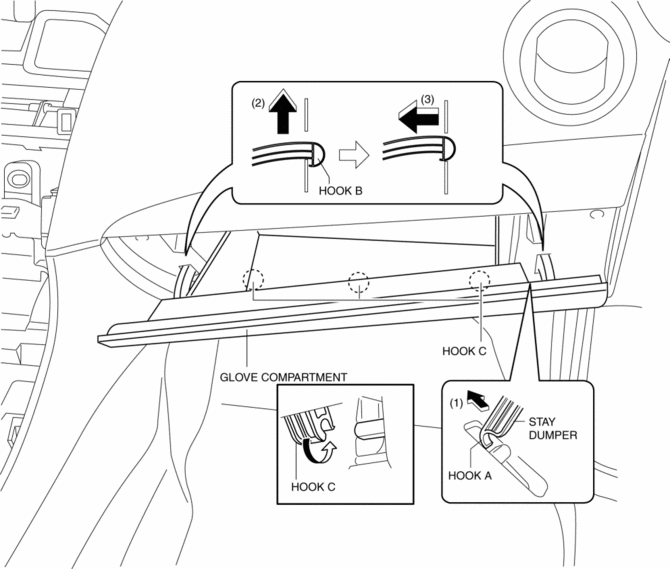
5. Install in the reverse order of removal.
 Glove Compartment Light Bulb Removal/Installation
1. Disconnect the negative battery cable..
2. Remove the following parts:
a. Passenger-side front scuff plate.
b. Passenger-side front side trim.
c. Dashboard under cover.
d. Glove compartme ...
 Knee Bolster Removal/Installation
1. Disconnect the negative battery cable..
2. Remove the following parts:
a. Driver-side front scuff plate.
b. Driver-side front side trim.
c. Hood release lever.
d. Upper panel.
e. Shift ...
Other materials:
Steering Wheel And Column Removal/Installation [With Advanced Keyless Entry
And Push Button Start System]
WARNING:
Handling the air bag module improperly can accidentally operate (deploy)
the air bag module, which may seriously injure you. Read the service warnings
before handling the air bag module..
1. Remove the driver-side front scuff plate..
2. Remove the driver-side front sid ...
How to use USB mode (Type B)
Type
Playable data
USB mode
MP3/WMA/AAC/OGG file
This unit does not support a USB 3.0 device. In addition, other devices may
not be
supported depending on the model or OS version.
USB devices formatted to FAT32 are supported (USB devices formatted to other
...
Rear Upper Arm Removal/Installation
1. When working on the right side of the vehicle, disconnect the canister vent
(CV) solenoid valve from the rear crossmember. (MZR 2.0 (Except Mexico), SKYACTIV-G
2.0, MZR 2.3 DISI Turbo, MZR 2.5 (Except Mexico))
2. Remove in the order indicated in the table.
3. Install in the reverse or ...
