
Mazda 3 Service Manual: Hood Disassembly/Assembly
Except Mazdaspeed3
1. Disassemble in the order indicated in the table.
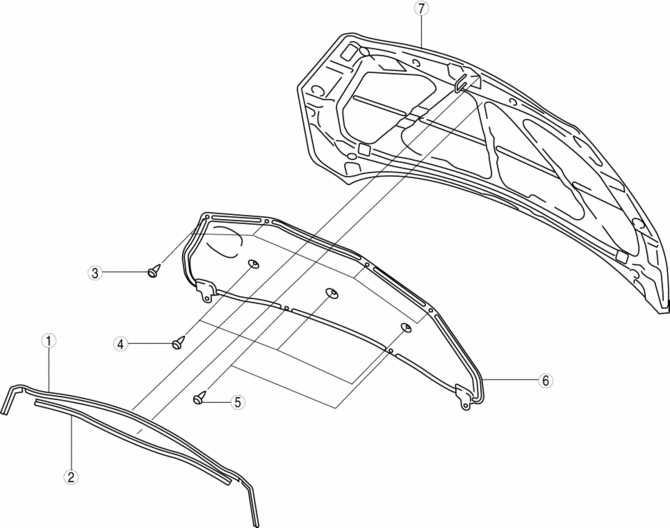
|
1 |
Weather strip parting seal |
|
2 |
Weather strip shroud seal |
|
3 |
Fasteners A |
|
4 |
Fasteners B |
|
5 |
Fasteners C |
|
6 |
Hood insulator |
|
7 |
Hood component |
2. Assemble in the reverse order of disassembly.
Mazdaspeed3
1. Disassemble in the order indicated in the table.
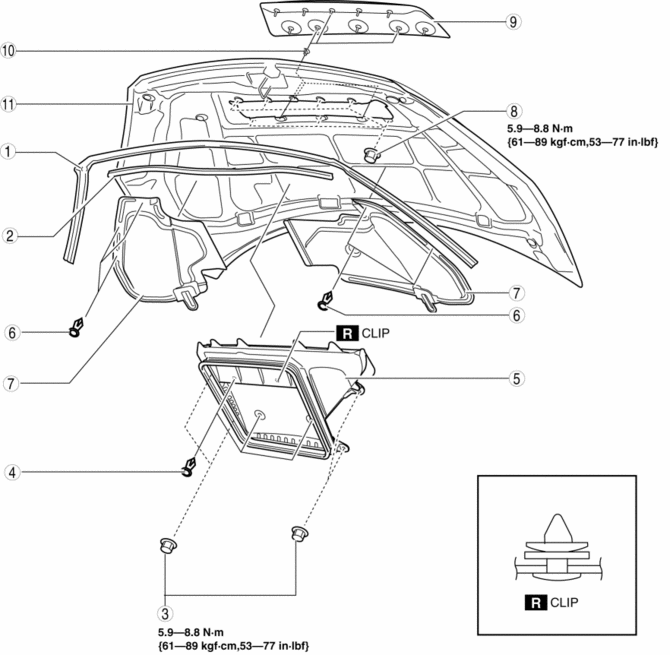
|
1 |
Weather strip parting seal |
|
2 |
Weather strip shroud seal |
|
3 |
Nut A |
|
4 |
Fasteners B |
|
5 |
Charge air cooler duct |
|
6 |
Fasteners C |
|
7 |
Hood insulator |
|
8 |
Nut D |
|
9 |
Charge air cooler duct cover |
|
10 |
Grommet |
|
11 |
Hood component |
2. Assemble in the reverse order of disassembly.
 Hood Adjustment
Gap Adjustment
1. Verify that the gap between the hood and the body is within the specification.
Standard clearance
a: -2.8—0.8 mm {-0.11—0.03 in}
b: –1.2—1.2 mm {–0. ...
 Hood Latch And Release Lever Removal/Installation
Hood latch
1. Open the hood.
2. Disconnect the negative battery cable..
3. Disconnect the hood latch switch connector. (vehicles with theft-deterrent
system)
4. Remove the bolts.
5. ...
Other materials:
Call Interrupt
A call can be interrupted to receive an
incoming call from a third party.
When is selected or the pickup
button on the steering wheel is pressed,
the current call is held and the system
switches to the new incoming call.
When is selected, the current
call is ended and the system switche ...
Volume/Display/Sound Controls
Volume adjustment
Turn the commander switch volume dial.
The volume switch on the steering switch
can also be pressed.
Display setting
Select the icon on the home
screen to
display the Settings screen.
Select the tab to select the item
you
would like to change.
Display OFF/Cloc ...
Pilot Bearing Inspection [G66 M R]
1. Perform the following procedures.
a. Remove the battery cover..
b. Disconnect the negative battery cable.
c. Remove the battery component. (ex: battery, battery tray and PCM component).
d. Remove the air cleaner component..
e. Remove the exhaust manifold insulator installation bolts an ...
