
Mazda 3 Service Manual: Horn Removal/Installation
1. Disconnect the negative battery cable..
2. Remove the front bumper..
3. Disconnect the connector.
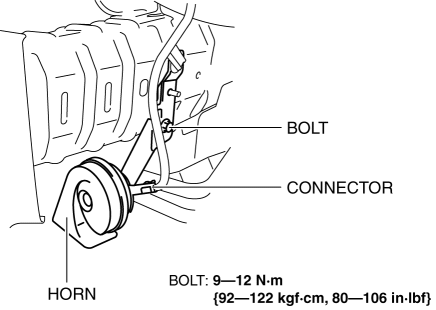
4. Remove the bolt.
5. Remove the horn.
6. Install in the reverse order of removal.
 Horn Inspection
1. Disconnect the negative battery cable..
2. Remove the front bumper..
3. Remove the horn..
4. Apply battery positive voltage and connect the ground as shown in the figure
and verify the horn ...

Other materials:
Seat Warmer
The front seats are electrically heated. The
ignition must be switched ON.
Press the seat warmer switch to illuminate
the indicator light while the ignition
is switched ON. The mode changes as
follows each time the seat warmer switch
is pressed.
WARNING
Be careful when using t ...
Displayable Range on the Screen
The images on the screen may be different from the actual conditions.
NOTE
The displayable range varies depending on the vehicle and road
conditions.
The displayable range is limited. Objects under the bumper or around
the bumper ends
cannot be displayed.
The distance appearing ...
Head Restraints
Your vehicle is equipped with head
restraints on all outboard seats and the
rear center seat * . The head restraints
are intended to help protect you and the
passengers from neck injury.
WARNING
Always drive with the head restraints
installed when seats are being used and
make s ...
