
Mazda 3 Owners Manual: Operating the Passenger Power Windows
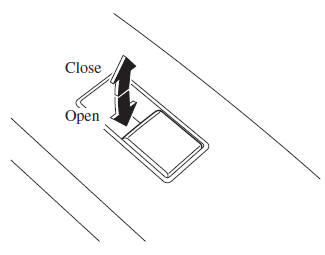
To open the window to the desired position, hold down the switch.
To close the window to the desired position, pull up the switch.
NOTE
- The power windows may be operated when the power window lock switch on the driver's door is in the unlocked position.
- The passenger windows may be opened or closed using the master control switches on the driver's door.
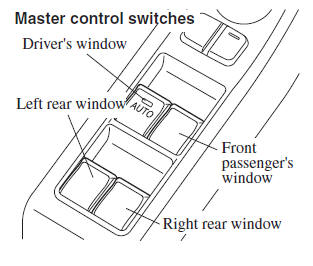
 Operating the Driver's Power
Window
Operating the Driver's Power
Window
Normal opening/closing
To open the window to the desired
position, lightly hold down the switch.
To close the window to the desired
position, lightly pull up the switch.
Auto-opening/closin ...
 Power Window Lock Switch
This feature prevents all power windows
from operating, except the driver's power
window. Keep this switch in the locked
position while children are in the vehicle.
Locked position (button depre ...
Other materials:
Air Intake Actuator Removal/Installation [Manual Air Conditioner]
1. Set the air intake mode to FRESH.
2. Disconnect the negative battery cable..
3. Remove the following parts:
a. Front scuff plate (Passenger-side).
b. Front side trim (Passenger-side).
c. Dashboard under cover.
d. Glove compartment.
e. Lower panel (Passenger-side).
f. Shower duct ( ...
Schedule 1
U.S.A. residents - Engine oil flexible maintenance interval
Use when the maintenance monitor for “Oil Change” is set to “Flexible”. For
details, see maintenance monitor.
Chart symbols:
I: Inspect: Inspect and clean, repair, adjust, fill up, or replace if
necessary.
T: Tighten
R ...
Seat Precautions
WARNINGMake sure the adjustable components of a seat
are locked in place:
Adjustable seats and seatbacks that are not securely locked are
dangerous. In a
sudden stop or collision, the seat or seatback could move, causing
injury. Make sure the
adjustable components of the ...
