
Mazda 3 Owners Manual: Power Window Lock Switch
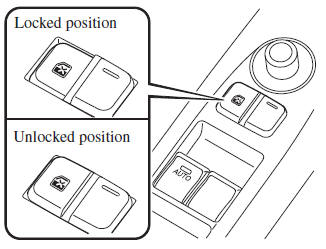
This feature prevents all power windows from operating, except the driver's power window. Keep this switch in the locked position while children are in the vehicle.
Locked position (button depressed): Only the driver's power window can be operated.
Unlocked position (button not depressed): All power windows on each door can be operated.
 Operating the Passenger Power Windows
To open the window to the desired
position, hold down the switch.
To close the window to the desired
position, pull up the switch.
NOTE
The power windows may be operated
when the power ...
 Moonroof
The moonroof can be opened or closed
electrically only when the ignition is
switched ON.
WARNING
Do not let passengers stand up or
extend part of the body through the
open moonr ...
Other materials:
Variable Swirl Shutter Valve Actuator Inspection [Mzr 2.3 Disi Turbo]
Operation Inspection
1. Remove the air hose..
2. Disconnect the vacuum hose from the variable swirl control solenoid valve.
3. Connect a vacuum pump to the variable swirl shutter valve actuator.
4. Apply vacuum and verify that the rod moves.
Vacuum
kPa {mmHg, inHg ...
Seat Belt Warning Beep
If the driver's seat belt is not fastened
when the ignition is switched ON, a beep
sound will be heard for about 6 seconds. If
the driver or the front passenger's seat belt
is not fastened and the vehicle is driven
at a speed faster than about 20 km/h (12
mph), a beep sound will be heard again ...
Filament Inspection
1. Turn the ignition switch to the ON position.
2. Turn the rear window defroster switch on.
CAUTION:
Directly touching the rear window defroster filament with the lead of the
tester could damage it. Wrap aluminum foil around the end of the lead and inspect
the filament by touc ...
