
Mazda 3 Service Manual: Keyless Antenna Removal/Installation
Interior, Front
1. Disconnect the negative battery cable..
2. Remove the following parts:
a. Upper panel.
b. Shift knob (MTX).
c. Selector lever knob (ATX).
d. Shift panel.
e. Side wall.
f. Center panel.
g. Audio unit.
h. Rear heat duct (1).
3. Disconnect the connector.
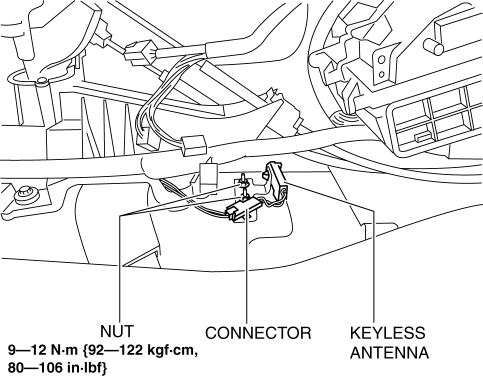
4. Remove the nuts.
5. Remove the keyless antenna.
6. Install in the reverse order of removal.
Interior, Rear
1. Disconnect the negative battery cable..
2. Remove the rear seat cushion..
3. Disconnect the connector.
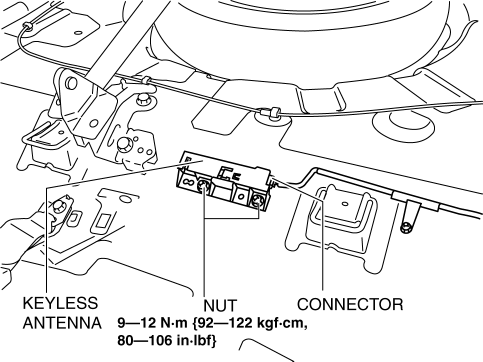
4. Remove the nuts.
5. Remove the keyless antenna.
6. Install in the reverse order of removal.
Exterior, Rear
1. Disconnect the negative battery cable..
2. Remove the rear combination light..
3. Remove the rear bumper..
4. Remove the nuts.
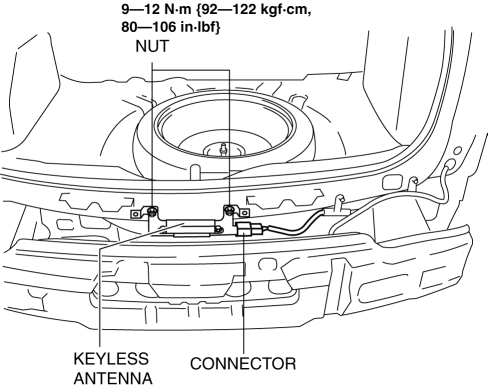
5. Disconnect the connector.
6. Remove the keyless antenna.
7. Install in the reverse order of removal.
Exterior, LF/RF
NOTE:
-
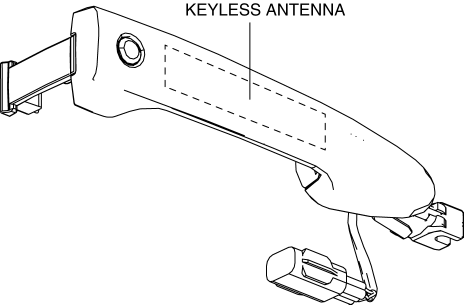
The keyless antenna (vehicle exterior, LF/RF) is built into the front outer handle..
 Door Lock Switch Removal/Installation
1. Disconnect the negative battery cable..
2. Remove the inner garnish..
3. Remove the front door trim..
4. Remove the front inner handle..
5. Remove the screws, then remove the door lock swit ...
 Keyless Beeper Inspection
1. Disconnect the negative battery cable..
2. Remove the front mudguard..
3. Remove the keyless beeper..
4. When applying battery positive voltage to the keyless beeper, verify that
an electro ...
Other materials:
Rear Brake (Disc) Removal/Installation
CAUTION:
If the brake hose is installed to the caliper on the vehicle, the tool cannot
be installed correctly resulting in brake fluid leakage due to improper installation.
Therefore, remove the caliper and brake hose as a single unit when removing
the caliper or brake hose, and tig ...
Engine Tune Up [Skyactiv G 2.0]
Engine Tune-up Preparation
NOTE:
If the accelerator pedal is depressed continuously for a specified time,
the engine speed may decrease to the idle speed. This is due to the fuel cut
control operation, which prevents overheating, and it does not indicate a malfunction.
The engine s ...
Replacing Windshield Wiper Blades
When the wipers no longer clean well, the
blades are probably worn or cracked.
Replace them.
CAUTION
To prevent damage to the wiper arms
and other components, do not try to
sweep the wiper arm by hand.
NOTE
When raising both windshield wiper arms,
raise the driver's side ...
