
Mazda 3 Service Manual: Keyless Beeper Removal/Installation
1. Disconnect the negative battery cable..
2. Slightly bend back the front mudguard..
3. Disconnect the connector.
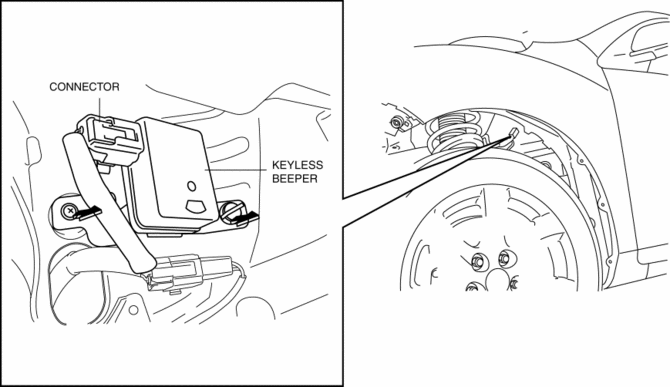
4. Remove the keyless beeper in the direction of the arrow shown in the figure.
5. Install in the reverse order of removal.
 Keyless Beeper Inspection
1. Disconnect the negative battery cable..
2. Remove the front mudguard..
3. Remove the keyless beeper..
4. When applying battery positive voltage to the keyless beeper, verify that
an electro ...
 Keyless Control Module Configuration
1. Connect the M-MDS (IDS) to DLC-2.
2. After the vehicle is identified, select the following items from the initialization
screen of the IDS.
Select “Module Programming”.
3. ...
Other materials:
Contact Authorized Mazda Dealer and Have Vehicle Inspected
If any of the following warning lights or the indicator light turns on/flashes, the system may
have a malfunction. Contact an Authorized Mazda Dealer to have your vehicle
inspected.
...
Body And Accessories SST
49 L067 001
Reflector
49 L067 002
Tripod
49 L067 003
Plum-bob
49 L067 006
Plum-bob
—
—
...
Front Seat Belt Pretensioner and Load Limiting Systems
For optimum protection, the driver and
front passenger seat belts are equipped
with pretensioner and load limiting
systems. For both these systems to work
properly you must wear the seat belt
properly.
Pretensioners:
When a collision is detected, the
pretensioners deploy simultaneously wit ...
