
Mazda 3 Owners Manual: Replacing Windshield Wiper Blades
When the wipers no longer clean well, the blades are probably worn or cracked.
Replace them.
| CAUTION To prevent damage to the wiper arms and other components, do not try to sweep the wiper arm by hand. |
NOTE When raising both windshield wiper arms, raise the driver's side wiper arm first.
When lowering the wiper arms, slowly lower the wiper arm from the passenger's side first while supporting it with your hand. Forcefully lowering the wiper arms could damage the wiper arm and blade, and may scratch or crack the windshield.
- Raise the wiper arm.
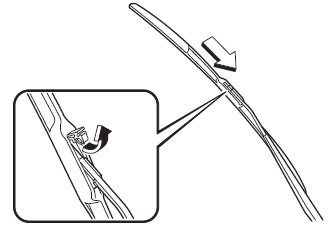
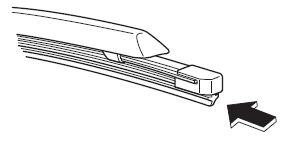
- Open the clip and slide the blade assembly in the direction of the arrow
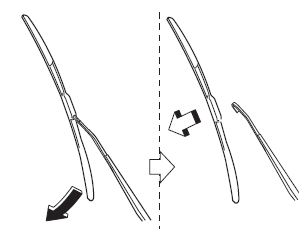
- Tilt the blade assembly and remove it from the arm.
| CAUTION To prevent damage to the windshield let the wiper arm down easily, do not let it slap down on the windshield. |
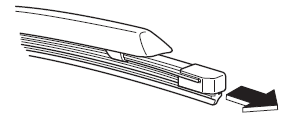
- Pull down the blade rubber and slide it out of blade holder.
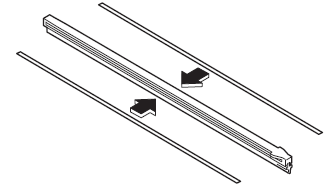
- Remove the metal stiffeners from each blade rubber and install them in the new blade.
CAUTION
|
- Carefully insert the new blade rubber.
Then install the blade assembly in the reverse order of removal.
 Wiper Blades
CAUTION
Hot waxes applied by automatic car
washers have been known to aff ect the
wiper's ability to clean windows.
To prevent damage to the wiper blades,
do not use gasolin ...
 Replacing Rear Window Wiper Blade (5-Door)
When the wiper no longer cleans well, the
blade is probably worn or cracked.
Replace it.
CAUTION
To prevent damage to the wiper arm
and other components, do not move
the wiper by ...
Other materials:
Smart City Brake Support
(SCBS)
The Smart City Brake Support (SCBS) system is designed to reduce damage in
the event
of a collision by operating the brake control (SCBS brake) when the system's
laser sensor
(front) detects a vehicle ahead and determines that a collision with a vehicle
ahead is
unavoidable. It may also be ...
Theft Deterrent System Reading Freeze Frame Data
1. Connect the M-MDS (IDS) to the DLC–2.
2. After the vehicle is identified, select the following items from the initialization
screen of the IDS.
Select “Body”.
Select "Burglar Service Functions".
3. Then, select the following item from the screen menu. ...
SUBARU Parking Assist
The SUBARU Parking Assist system in the Subaru Solterra is engineered
to accurately estimate the distance between the vehicle and nearby obstacles, such
as walls or other objects, by utilizing advanced ultrasonic sensors. The system
then communicates this information to the driver through visu ...
