
Mazda 3 Owners Manual: Manual Climate Control
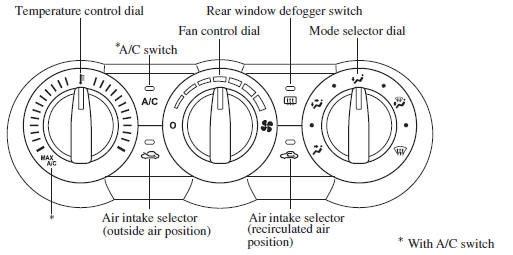
- Control Switches
- Heating
- Cooling (With air conditioner)
- Windshield Defrosting and Defogging
- Dehumidifying (With air conditioner)
 Selecting the Airflow Mode
Dashboard Vents
Defroster and Floor Vents
Dashboard and Floor Vents
Defroster Vents
Floor Vents
...
 Control Switches
Temperature control dial
This dial controls temperature. Turn it
clockwise for hot and counterclockwise
for cold.
NOTE
When the mode is set to or
with the
fan control dial in a position oth ...
Other materials:
Battery Removal/Installation [Mzr 2.0, Mzr 2.5]
1. Remove in the order indicated in the table.
2. Install in the reverse order of removal.
1
Battery cover
(See Battery Cover Removal Note.)
(See Battery Cover Installation Note.)
2
Negative battery cable
3
...
Hood Disassembly/Assembly
Except Mazdaspeed3
1. Disassemble in the order indicated in the table.
1
Weather strip parting seal
2
Weather strip shroud seal
3
Fasteners A
4
Fasteners B
5
...
Clutch Pedal Position (CPP) Switch Inspection [Mzr 2.0, Mzr 2.5]
Continuity Inspection
1. Verify that the CPP switch is installed properly..
2. Remove the battery cover..
3. Disconnect the negative battery cable..
4. Disconnect the CPP switch connector..
5. Verify that the continuity between CPP switch terminals A and B when the clutch
pedal is depress ...
