
Mazda 3 Service Manual: Oil Control Valve (OCV) Removal/Installation [Skyactiv G 2.0]
WARNING:
-
A hot engine can cause severe burns. Turn off the engine and wait until it is cool before servicing.
1. Remove the battery cover..
2. Disconnect the negative battery cable..
3. Remove the plug hole plate..
4. Remove the ignition coil/ion sensors..
5. Remove the cylinder head cover..
6. Remove in the order indicated in the table.
7. Install in the reverse order of removal.
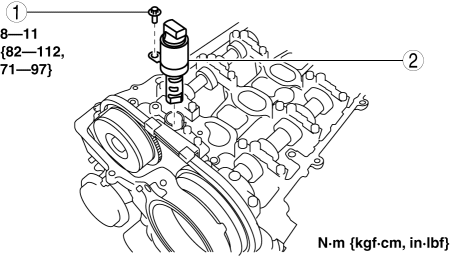
|
1 |
OCV installation bolt |
|
2 |
OCV |
 Oil Control Valve (OCV) Removal/Installation [Mzr 2.3 Disi Turbo]
1. Remove the battery cover..
2. Disconnect the negative battery cable..
3. Remove the charge air cooler..
4. Remove the ignition coils..
5. Disconnect the ventilation hose from the cylinder h ...
 Power Steering Fluid Inspection
Fluid Level Inspection
1. Verify that the fluid level is between MAX and MIN of the sub tank when the
engine is cold.
If the fluid is not at the specified level, adjust the fluid level (MIN ...
Other materials:
Stay Damper Disposal
NOTE:
The stay damper contains colorless, odorless, nontoxic gas.
1. Wear protective eye wear.
2. Position the stay damper horizontally.
3. Drain gas and oil by cutting the position indicated in the figure to a
2—3 mm {0.08—0.11 in} depth using a metal saw.
CAUTION:
...
Instrument Cluster Inspection
Speedometer
Using a speedometer tester
CAUTION:
When only the front or the rear wheels are driven using a speedometer tester,
the ABS or DSC may determine that the vehicle speed signal is in error and the
engine cannot be stopped by the normal operation. If the engine cannot be stopp ...
Center Panel Removal/Installation
1. Disconnect the negative battery cable..
2. Affix protective tape to the position shown in the figure.
3. Hold parts (A) shown in the figure with your hands and pull the lower edge
of the center panel in the direction of the arrow (1), and remove clips A.
CAUTION:
Be careful no ...
