
Mazda 3 Service Manual: Oil Pressure Switch Inspection
MZR 2.0, MZR 2.5, MZR 2.3 DISI Turbo
WARNING:
-
A hot engine can cause severe burns. Turn off the engine and wait until it is cool before removing the exhaust system.
1. Disconnect the negative battery cable..
2. Remove the aerodynamic under cover No.2..
3. Remove the oil pressure switch..
4. Apply air pressure of approx. 40 kPa {0.41 kgf/cm2, 5.8 psi} to the oil pressure switch as shown in the figure.
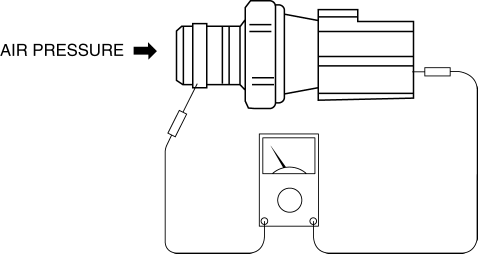
5. Measure continuity between oil pressure switch terminal A and the thread area.
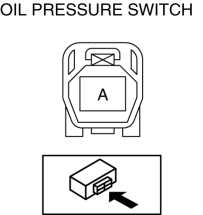
-
If there is any malfunction, replace the oil pressure switch.
|
Measurement condition |
Continuity |
|
Air pressure applied |
No |
|
Air pressure not applied |
Yes |
SKYACTIV-G 2.0
WARNING:
-
A hot engine can cause severe burns. Turn off the engine and wait until it is cool before removing the exhaust system.
1. Disconnect the negative battery cable..
2. Remove the aerodynamic under cover No.2..
3. Remove the oil pressure switch..
4. Apply air pressure of approx. 120 kPa {1.22 kgf/cm2, 17.4 psi} to the oil pressure switch as shown in the figure.
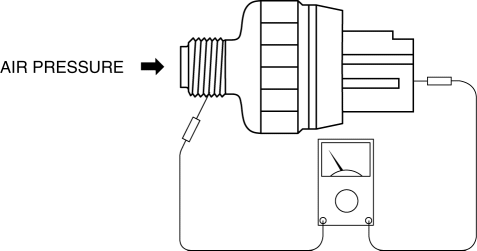
5. Measure continuity between oil pressure switch terminal A and the thread area.
-
If there is any malfunction, replace the oil pressure switch.
|
Measurement condition |
Continuity |
|
Air pressure applied |
No |
|
Air pressure not applied |
Yes |
 Transaxle Oil Replacement [G66 M R]
1. Park the vehicle on level ground.
2. Remove the aerodynamic under cover No.2..
3. Remove the drain plug and washer.
4. Drain the oil into a suitable container.
5. Install a new washer a ...
 Oil Pressure Switch Inspection [FS5 A EL]
CAUTION:
Water or foreign objects entering the connector can cause a poor connection
or corrosion. Be sure not to drop water or foreign objects on the connector
when disconnecting it.
...
Other materials:
Windshield Defrosting and
Defogging
Set the mode selector dial to the
position and turn the fan control dial to the
desired speed.
In this position, the outside air position is automatically selected, and when
the fan control dial is ON, the air conditioner automatically turns on. The air
conditioner will directly dehumidify ...
How to use USB mode (Type A)
Type
Playable data
USB mode
MP3/WMA/AAC file
This unit does not support a USB 3.0
device. In addition, other devices may not
be supported depending on the model or
OS version.
Playback
Switch the ignition to ACC or ON.
Press the power/volume dial to ...
Hood Latch Switch Inspection
1. Disconnect the negative battery cable..
2. Remove the hood latch..
3. Verify that the continuity is as indicated in the table.
If not as indicated in the table, replace the hood latch.
NOTE:
Press the latch lever in using a flathead screwdriver to inspect the c ...
