
Mazda 3 Service Manual: Parking Brake Lever Inspection
Stroke Inspection
1. Pump the brake pedal a few times.
2. Pull the parking brake lever two to three times.
3. Inspect the parking brake stroke by slowly pulling at point A 50 mm {1.97 in}
from the end of the parking brake lever with a force of 98 N {10 kgf, 22 lbf}
and counting the number of notches (clicking sound).
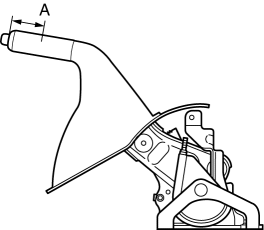
-
If not within the specification, adjust the parking brake lever.
-
Parking brake lever stroke when pulled at 98 N {10 kgf, 22 lbf}
-
2—6 notches
 Parking Brake Lever Adjustment
1. Pump the brake pedal a few times.
2. Remove the upper panel..
3. Turn the adjusting nut and adjust the parking brake lever.
4. After adjustment, pull the parking brake lever one notch and ...
 Parking Brake Lever Removal/Installation
1. Remove the following parts:
a. Upper panel.
b. Shift knob (MTX).
c. Selector lever knob (ATX).
d. Shift panel.
e. Side wall.
f. Console.
2. Remove in the order indicated in the table. ...
Other materials:
Glossary of Terms
Tire Placard: A label indicating the OE tire sizes, recommended inflation
pressure, and the
maximum weight the vehicle can carry.
Tire Identification Number (TIN): A number on the sidewall of each tire
providing
information about the tire brand and manufacturing plant, tire size, and date o ...
Starting a Flooded Engine
If the engine fails to start, it may be
flooded (excessive fuel in the engine).
Follow this procedure:
If the engine does not start within
five seconds on the first try, wait ten
seconds and try again.
Make sure the parking brake is on.
Depress the accelerator all the way and
hold ...
Instrumentation/Driver Info. Personalization Features Setting Procedure
Instrument Cluster
1. Connect the M-MDS (IDS) to the DLC–2.
2. After the vehicle is identified, select the following items from the initial
screen of the M-MDS.
Select the “Module Programming”.
3. Then, select items from the screen menu in the following order.
Se ...
