
Mazda 3 Service Manual: Power Brake Unit Removal/Installation [Mzr 2.3 Disi Turbo]
CAUTION:
-
Once the brake switch clearance has automatically been adjusted, it cannot be adjusted again. Therefore, replace the switch with a new one when replacing the power brake unit or performing any procedure that changes the pedal stroke.
-
Secure the steering wheel using tape or a cable to prevent the steering shaft from rotating after disconnecting the steering shaft. If the steering wheel rotates after the steering shaft and the steering gear and linkage are disconnected, the internal parts of the clock spring could be damaged.
1. Remove the battery and battery tray..
2. Remove the master cylinder..
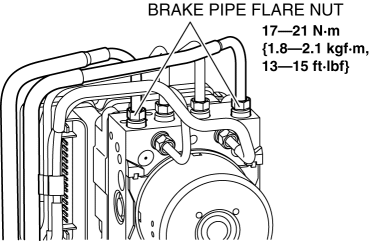
3. Loosen the brake pipe flare nuts as shown in the figure.
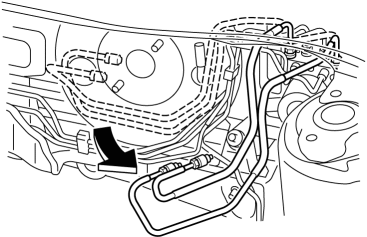
4. Move the brake pipes as shown in the figure.
5. Disconnect the steering shaft from the steering gear and linkage..
6. Remove in the order indicated in the table.
7. Remove the brake switch..
8. Install in the reverse order of removal.
9. After installation, inspect the brake pedal..
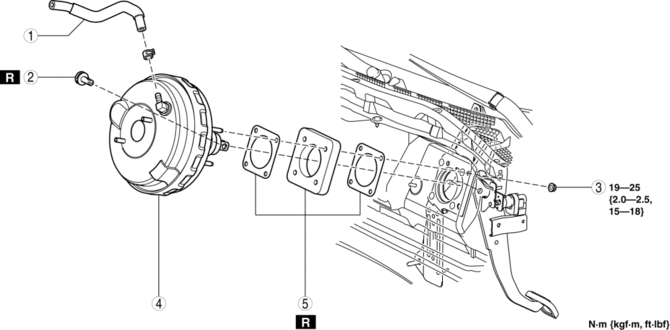
|
1 |
Vacuum hose |
|
2 |
Joint pin (See BRAKE PEDAL REMOVAL/INSTALLATION.) |
|
3 |
Nut |
|
4 |
Power brake unit |
|
5 |
Gasket |
 Power Brake Unit Removal/Installation [Mzr 2.0, Skyactiv G 2.0, Mzr 2.5]
CAUTION:
Once the brake switch clearance has automatically been adjusted, it cannot
be adjusted again. Therefore, replace the switch with a new one when replacing
the power brake unit or ...
 Vacuum Hose Removal/Installation [Mzr 2.0, Mzr 2.5]
1. Remove the battery and battery tray..
2. Remove the vacuum hose from the vacuum hose clip.
3. Insert a thin flathead screwdriver at the point indicated by the arrow in
the figure, push th ...
Other materials:
ALL AUTO (ECO) control
In the Subaru Solterra, the ALL AUTO (ECO) control intelligently
manages interior comfort by automatically adjusting seat heaters/radiant heaters*,
seat ventilators*, and the heated steering wheel* based on the selected climate
settings, as well as real-time cabin and outside temperature condi ...
Side Air Bag Sensor No. 2 Removal/Installation [Two Step Deployment Control
System]
WARNING:
Handling the side air bag sensor improperly can accidentally operate (deploy)
the air bag module, which may seriously injure you. Read the air bag system
service warnings and cautions before handling the side air bag sensor..
1. Switch the ignition to off.
2. Disconnec ...
Front Combination Light Removal/Installation
WARNING:
Incorrect servicing of the discharge headlights could result in electrical
shock. Before servicing the discharge headlights, always refer to the discharge
headlight service warnings..
1. Disconnect the negative battery cable..
2. Remove the front bumper..
3. Disconne ...
