
Mazda 3 Service Manual: Power Window Subswitch Inspection
Passenger's Side
1. Disconnect the negative battery cable..
2. Remove the inner garnish..
3. Remove the front door trim..
4. Remove the power window subswitch..
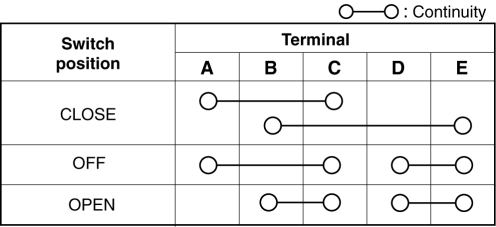
5. Verify that the continuity is as indicated in the table using a tester.
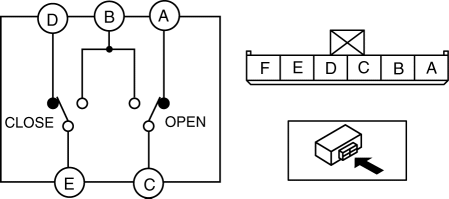
-
If not as indicated in the table, replace the power window subswitch.
Rear
1. Disconnect the negative battery cable..
2. Remove the rear door trim..
3. Remove the power window subswitch..
4. Verify that the continuity is as indicated in the table using a tester.
-
If not as indicated in the table, replace the power window subswitch.
 Power Window Motor Removal/Installation
Front Power Window Motor
1. Fully lower the front door glass.
2. Disconnect the negative battery cable..
3. Remove the inner garnish..
4. Remove the front door trim..
5. Remove the front door ...
 Power Window Subswitch Removal/Installation
Passenger's Side
1. Disconnect the negative battery cable..
2. Remove the inner garnish..
3. Remove the front door trim..
4. Remove the power window subswitch..
5. Install in the reverse ...
Other materials:
Back Up Light Switch Inspection
1. Disconnect the negative battery cable..
2. Remove the battery component. (ex: battery, battery tray and PCM component)
(G35-MR,G66M-R).
3. Remove the aerodynamic under cover No.2. (G35-MR,G66M-R,C66M-R).
4. Disconnect the back-up light switch connector..
5. Verify that the continuity be ...
Hood Latch Switch Inspection
1. Disconnect the negative battery cable..
2. Remove the hood latch..
3. Verify that the continuity is as indicated in the table.
If not as indicated in the table, replace the hood latch.
NOTE:
Press the latch lever in using a flathead screwdriver to inspect the c ...
If the vehicle becomes stuck
If your Subaru Solterra becomes immobilized in mud, snow, or loose
terrain, follow the steps below to safely regain traction and mobility.
Recovering procedure
1. Turn off the EV system, apply the parking brake, and set the gear selector
to P.
2. Clear away mud, snow, or sand from around the ...
