
Mazda 3 Service Manual: Rear Beltline Molding Removal/Installation
1. Fully open the rear door glass.
2. Remove the rear door trim..
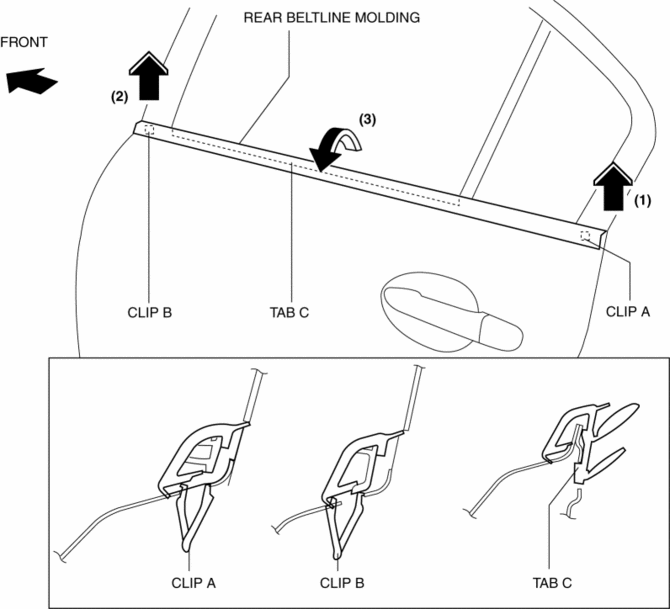
3. Remove clip A using a fastener remover and pull up the rear beltline molding in the direction of the arrow (1) shown in the figure.
4. Remove clip B using a fastener remover and pull up the rear beltline molding in the direction of the arrow (2) shown in the figure.
5. Rotate the rear beltline molding in the direction of the arrow (3) shown in the figure and remove it while detaching tabs C.
6. Install in the reverse order of removal.
 Front Mudguard Removal/Installation
1. Remove screw A, fasteners B, screws C, fasteners D, and E.
2. Remove the front mudguard in the direction of the arrow shown in the figure.
3. Install in the reverse order of removal. ...
 Rear Bumper Disassembly/Assembly
1. Remove the License plate lights..
2. Disassemble in the order indicated in the table.
1
Fastener A
2
Bracket
3
...
Other materials:
Electro Hydraulic Power Assist Steering (EHPAS) Control Module Configuration
CAUTION:
If the EHPAS CM configuration is not completed, the EHPAS will not operate
properly. If the EHPAS CM is replaced, always carry out the EHPAS CM configuration
so that the EHPAS operates properly.
1. Connect the M-MDS (IDS) to the DLC-2.
2. After the vehicle is ident ...
Engine Oil Replacement [Mzr 2.0, Mzr 2.5]
WARNING:
Hot engines and engine oil can cause severe burns. Turn off the engine and
wait until it and the engine oil have cooled.
A vehicle that is lifted but not securely supported on safety stands is dangerous.
It can slip or fall, causing death or serious injury. Never work ...
Air Bleeding
CAUTION:
If the strainer is removed, impurities may penetrate the power steering system
and damage it. To prevent this, always bleed air with the strainer installed.
Do not maintain the steering wheel fully turned for 5 s or more. The oil
temperature could rise and damage ...
