
Mazda 3 Service Manual: Rear Coil Spring Removal/Installation
1. Disconnect the auto leveling sensor lower side. (Vehicles with AFS).
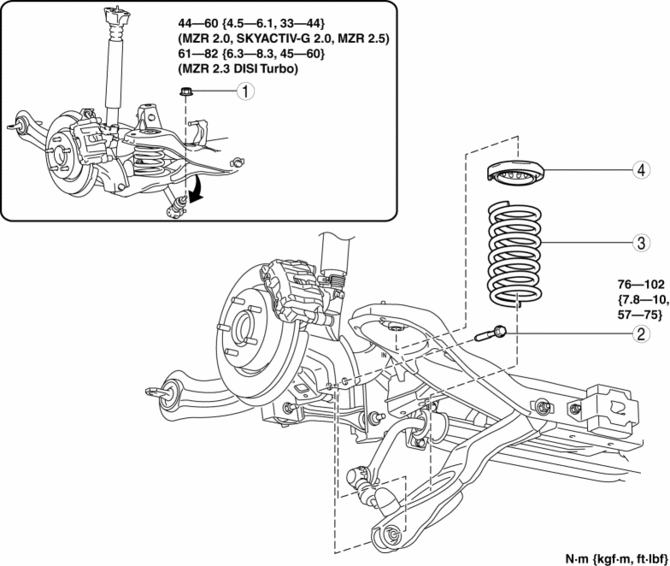
2. Remove in the order indicated in the table.
3. Install in the reverse order of removal.
4. Inspect the wheel alignment and adjust it if necessary..
|
1 |
Rear stabilizer control link upper nut |
|
2 |
Rear lower arm outer bolt . |
|
3 |
Rear coil spring . |
|
4 |
Upper spring seat rubber |
Rear Lower Arm Outer Bolt Removal Note
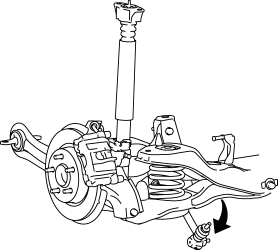
1. Rotate the rear stabilizer component downwards as shown in the figure.
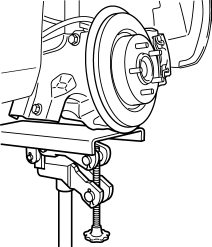
2. Support the rear lower arm using a jack.
3. Loosen the rear lower arm inner bolt.
4. Remove the rear lower arm outer bolt.
Rear Coil Spring Installation Note
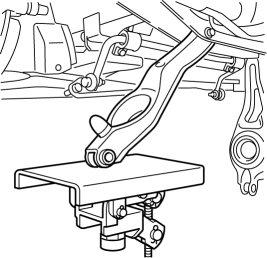
1. Position the jack under the rear lower arm and jack up slowly.
WARNING:
-
Installing the coil spring is dangerous. The coil spring could fly off and cause serious injure or death, and damage the vehicle.
2. Align the upper end of the rear coil spring with the step of the upper spring seat rubber.
3. Align the lower end of the rear coil spring with the step of the lower spring seat rubber.
4. Install the lower arm outer bolt.
 Rear Suspension
...
 Rear Lateral Link Removal/Installation
1. Remove in the order indicated in the table.
2. Install in the reverse order of removal.
3. Inspect the wheel alignment and adjust it if necessary..
1
Rear stabiliz ...
Other materials:
Rear Bumper Removal/Installation
4SD
1. Disconnect the negative battery cable..
2. Remove the rear combination light..
3. Remove the fastener A and screw B.
4. Remove the rear splash shield..
5. Remove the screws C.
6. Remove the bolts D.
7. Affix the protective tape to the position shown in the figure.
...
Applications
NOTE
Depending on the grade and specification,
the screen display may differ.
Select the icon on the home screen to
display the Applications screen. The
following information can be verified.
Top screen
Item
Function
HD
Radio™
Traffic
Map
— ...
Transaxle Oil Replacement [A26 M R]
1. Park the vehicle on level ground.
2. Remove the aerodynamic under cover No.2..
3. Remove the drain plug and gasket.
4. Drain the oil into a suitable container.
5. Install a new gasket and the drain plug.
Tightening torque
28—51 N·m {2.9—5.2 kgf·m, 21—37 ft·lbf}
...
