
Mazda 3 Service Manual: Rear Door Hinge Removal/Installation
1. Disconnect the negative battery cable..
2. Remove the following parts:
a. Rear door.
b. Front scuff plate.
c. Rear scuff plate.
d. B-pillar lower trim.
3. Remove in the order indicated in the table.
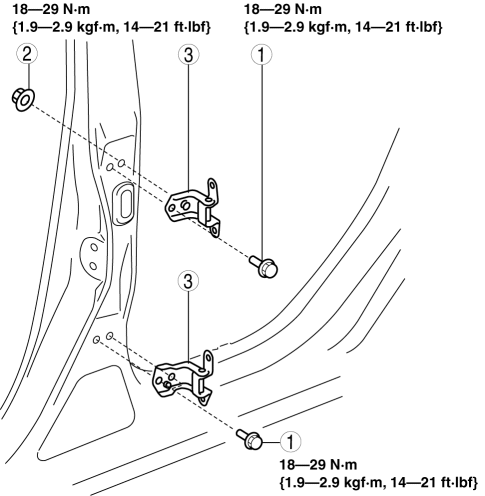
|
1 |
Bolt |
|
2 |
Nut |
|
3 |
Rear door hinge |
4. Install in the reverse order of removal.
 Rear Door Checker Removal/Installation
1. Fully close the rear door glass.
2. Disconnect the negative battery cable..
3. Remove the rear door trim..
4. Remove the rear door speaker..
5. Remove the bolt A.
6. Remove the bolts ...
 Rear Door Latch And Lock Actuator Inspection
1. The following actuator and switch are integrated with the rear door latch
and lock actuator. Inspect the rear door latch and lock actuator according to each
inspection procedure for the followi ...
Other materials:
Driving assist systems
In the Subaru Solterra, a range of advanced driving assist systems
work seamlessly in the background to enhance safety, stability, and overall driving
performance. These systems automatically respond to changing road and driving conditions;
however, they are designed to support the driver and ...
Sunlight/Temperature Sensor
The climate control system measures
inside and outside temperatures, and
sunlight. It then sets temperatures inside
the passenger compartment accordingly.
CAUTION
Do not obstruct either sensor,
otherwise the climate control system
will not operate properly.
...
Windshield Wiper Arm And Blade Removal/Installation
1. Remove in the order indicated in the table.
1
Cap
2
Nut
3
Windshield wiper arm
(See Windshield Wiper Arm Installation Note.)
4
Windshield wiper blade
5
...
