
Mazda 3 Owners Manual: Steering Wheel
| WARNING
Never adjust the steering wheel while
the vehicle is moving:
Adjusting the steering wheel while
the vehicle is moving is dangerous. Moving it can very easily cause the driver to abruptly turn to the left or right. This can lead to loss of control or an accident. |
Steering Wheel Adjustment
To change the angle or length of the steering wheel:
- Stop the vehicle, and then pull down the lock release lever under the steering column.
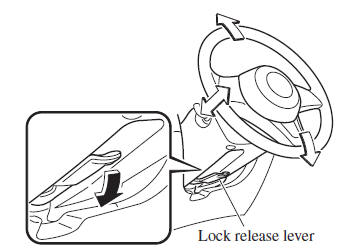
- Tilt the steering wheel and/or adjust the steering column length to the desired positions, then push the lever up to lock the column.
- Attempt to push the steering wheel up and down to make sure it's locked before driving.
 Fuel-Filler Lid and Cap
WARNING
When removing the fuel-fi ller cap,
loosen the cap slightly and wait for any
hissing to stop, then remove it:
Fuel spray is dangerous. Fuel can
burn skin and eyes and cau ...
 Mirrors
Before driving, adjust the inside and
outside mirrors. ...
Other materials:
Underbody Maintenance
Road chemicals and salt used for ice and
snow removal and solvents used for dust
control may collect on the underbody. If
not removed, they will speed up rusting
and deterioration of such underbody parts
as fuel lines, frame, floor pan, and exhaust
system, even though these parts may be
coate ...
Child Restraint Seat Anchor Removal/Installation
4SD
1. Remove the cover.
2. Remove the bolt and child-restraint seat anchor.
3. Install in the reverse order of removal.
5HB
1. Remove the trunk end trim..
2. Remove the bolt and child-restraint seat anchor.
3. Install in the reverse order of removal. ...
Mass Air Flow (MAF) Sensor/Intake Air Temperature (Iat) Sensor No.1 Removal/Installation
[Skyactiv G 2.0]
CAUTION:
Be careful not to hit the sensor element or allow foreign matter to get on
it during sensor removal/installation. If the sensor element is hit or foreign
matter gets on it, an error may occur in the sensor output signal resulting
in deterioration in the engine control.
...
