
Mazda 3 Service Manual: Towing
-
Proper lifting and towing are necessary to prevent damage to the vehicle. Government and local laws must be followed.
-
A towed vehicle usually should have its drive wheel (front wheels) off the ground. If excessive damage or other conditions prevent this, use wheel dollies.
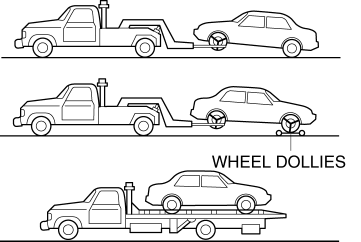
-
When towing with the rear wheels on the ground, release the parking brake.
CAUTION:
-
Do not tow the vehicle pointed backward with driving wheels on the ground. This may cause internal damage to the transaxle.
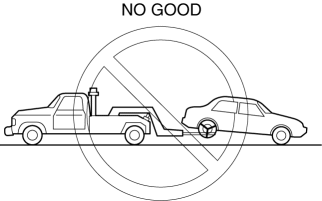
CAUTION:
-
Do not tow with sling–type equipment. This could damage your vehicle. Use wheel–lift or flatbed equipment.
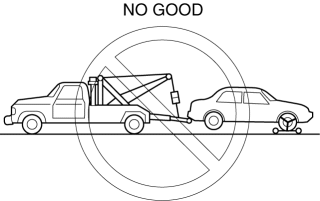
Vehicle Securing Position
-
When transporting the vehicle by flat bed tow truck or trailer, secure the vehicle to the trailer using the holes and left tiedown loop shown in the figure.
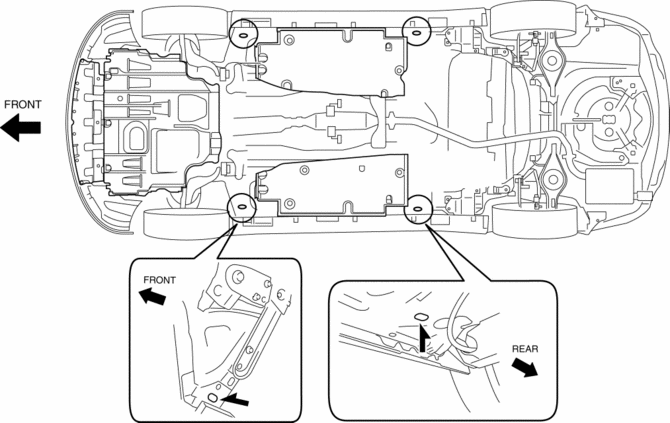
CAUTION:
-
To prevent damage to the vehicle, do not use the tiedown eyelet (front) and the left/right tiedown loops (rear) for towing the vehicle using another vehicle.
-
Do not use the tie-down eyelet and rear hook for tying down the vehicle onto a trailer and flatbed tow truck. It may cause damage to the vehicle.
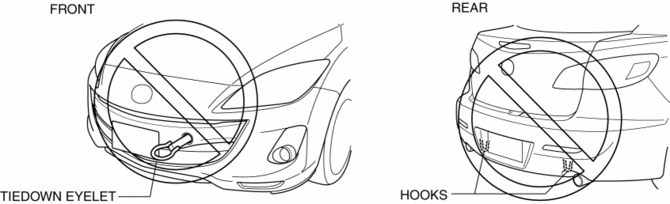
NOTE:
-
The tiedown eyelet (front) and the tiedown loops (rear) are used only when the vehicle is transported by ship.
 Trailer
...
 Body
Body
...
Other materials:
Front Door Latch And Lock Actuator Removal/Installation
1. To access the glass installation bolt, position the front door glass so that
the distance from the top of the front door glass to the upper part of the front
beltline molding is approx. 80 mm {3.1 in}.
2. Disconnect the negative battery cable..
3. Remove the following parts:
a. Inne ...
Oil Pan Removal/Installation [Mzr 2.0, Mzr 2.5]
WARNING:
Hot engines and engine oil can cause severe burns. Turn off the engine and
wait until it and the engine oil have cooled.
A vehicle that is lifted but not securely supported on safety stands is dangerous.
It can slip or fall, causing death or serious injury. Never work ...
RSA (Road Sign Assist)
In the Subaru Solterra, the Road Sign Assist (RSA) system uses the
front camera and, when available, navigation data to identify traffic signs such
as speed limits and restrictions. Once recognized, the system provides clear visual
alerts and, when necessary, audible warnings to help keep the ...
