
Mazda 3 Service Manual: Front Drain Hose Removal
1. Set the air intake mode to FRESH.
2. Set the air mix mode to MAX COLD.
3. Disconnect the negative battery cable.
4. Remove the rain sensor cover. (Vehicles with auto light / wiper system).
5. Disconnect the rain sensor connector. (Vehicles with auto light / wiper system)
6. Partially peel back the seaming welt.
7. Remove the following parts:
a. Front doors.
b. Front scuff plate.
c. Front side trim.
d. Dashboard under cover.
e. Glove compartment.
f. Upper panel.
g. Shift lever knob (MTX).
h. Selector lever knob (ATX).
i. Shift panel.
j. Side wall.
k. Console.
l. Shift lever component (MTX).
m. Selector lever component (ATX).
n. Hood release lever from the lower panel.
o. Lower panel.
p. Knee bolster.
q. Driver-side air bag module.
r. Steering wheel.
s. Column cover.
t. Combination switch.
u. Joint cover.
v. Steering shaft.
w. Center panel.
x. Audio unit.
y. Climate control unit.
z. Instrument cluster.
aa. Center cover.
ab. Dashboard upper panel.
ac. Hole cover.
ad. Information display (with information display).
ae. multi information display (with multi information display).
af. A-pillar trim.
ag. Windshield wiper arm and blade.
ah. Front fender molding.
ai. Cowl grille.
aj. Windshield wiper motor.
ak. Dashboard.
al. Sunroof seaming welt
am. Rear scuff plate.
an. B-pillar lower trim.
ao. Upper anchor of the front seat belt.
ap. B-pillar upper trim.
aq. Rear seat cushion.
ar. Tire house trim.
as. Trunk side upper trim (5HB).
at. C-pillar trim.
au. Map light.
av. Sunvisor.
aw. Assist handle.
ax. Headliner.
8. Disconnect the auto-dimming mirror connector. (vehicles with auto-dimming mirror)
9. Disconnect the roof harness connector, remove the clip, and remove the connector.
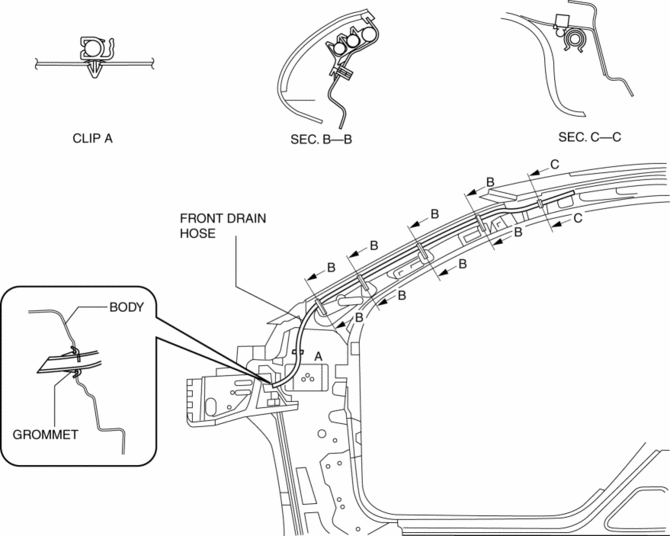
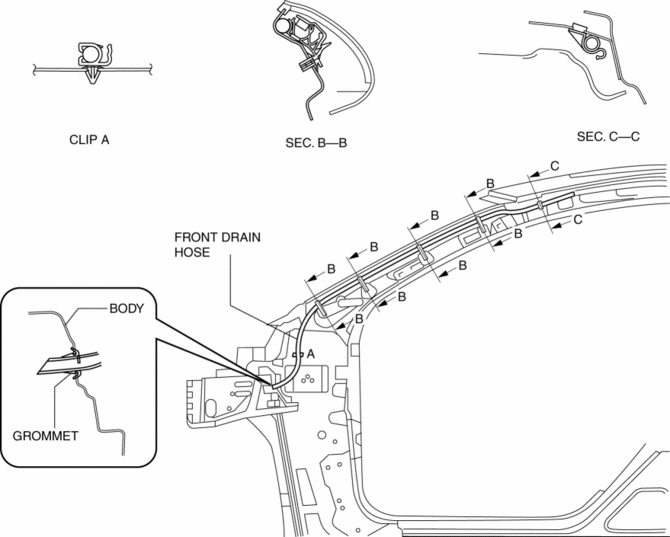
10. Disconnect the front drain hose from the sunroof frame.
11. Remove the front drain hose from the clips.
12. Pull the front drain hose into the room side.
13. Remove the front drain hose.
LH
RH
 Front Drain Hose Installation
CAUTION:
If the front drain hose is pinched or bent anywhere, the water in the hose
may not discharge and enter the inside of the vehicle. During and after installation
of the trims and ...
 Glass Panel Adjustment
1. Fully close the glass panel.
2. Measure the gap and height between the glass panel and body.
If not as specified, loosen the glass panel installation screws and reposition
the glas ...
Other materials:
Transaxle Oil Replacement [G35 M R]
1. Park the vehicle on level ground.
2. Remove the aerodynamic under cover No.2..
3. Remove the drain plug and washer.
4. Drain the oil into a suitable container.
5. Install a new washer and the drain plug.
Tightening torque
39—59 N·m {4.0—6.0 kgf·m, 29—43 ft·lbf}
...
Manifold Absolute Pressure (Map) Sensor/Intake Air Temperature (Iat) Sensor
No.2 Removal/Installation [Skyactiv G 2.0]
NOTE:
Because the IAT sensor No.2 is integrated in the MAP sensor, replacing the
IAT sensor No.2 includes replacement of the MAP sensor/IAT sensor No.2.
1. Remove the battery cover..
2. Disconnect the negative battery cable..
3. Disconnect the MAP sensor/IAT sensor No.2 connecto ...
Operating the Compact Disc (CD) Player
NOTE
If a disc has both music data (CD-DA)
and MP3/WMA/AAC files, playback of the
two or three file types differs depending on
how the disc was recorded.
Inserting the CD
Insert the CD into the slot, label-side up.
The auto-loading mechanism will set the
CD and begin play.
NOTE
T ...
