
Mazda 3 Service Manual: Trunk Lid Release Actuator Inspection
1. Disconnect the negative battery cable..
2. Remove the trunk lid trim..
3. Remove the trunk lid latch and release actuator..
4. Press the latch in using a flathead screwdriver to inspect the latch lever condition.
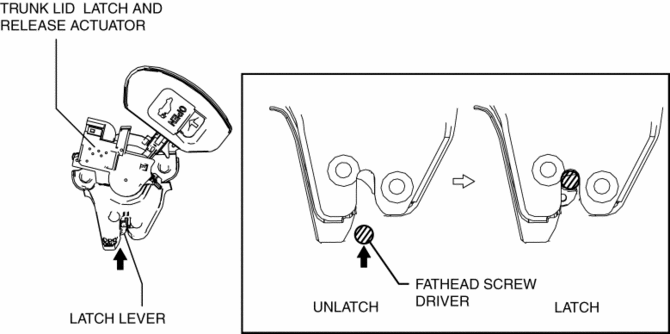
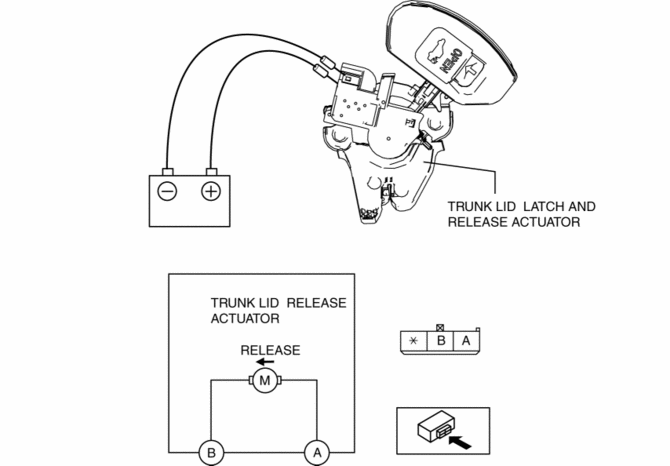
5. Connect terminal A to the positive battery voltage, connect terminal B to the ground, and verify that the latch lever is released and the condition changes to the unlatch condition.
-
If the operation cannot be verified, replace the trunk lid latch and release actuator.
 Trunk Lid Opener Lever Removal/Installation
1. Remove the front scuff plate (LH)..
2. Remove the front side trim (LH)..
3. Remove the fuel-filler lid opener bezel..
4. Partially peel back the floor covering.
5. Remove the bolts.
...
 Trunk Lid Removal/Installation
WARNING:
Removing the trunk lid stay damper without supporting the trunk lid can be
dangerous. The trunk lid may fall and injure you. Be sure to open the trunk
lid completely and support ...
Other materials:
Timing Chain Removal/Installation [Mzr 2.0, Mzr 2.5]
1. Remove the battery cover..
2. Disconnect the negative battery cable..
3. Remove the plug hole plate..
4. Disconnect the wiring harness.
5. Remove the ignition coils..
6. Remove the spark plugs..
7. Remove the ventilation hose.
8. Remove the coolant reserve tank with the hose still c ...
Transaxle Oil Replacement [A26 M R]
1. Park the vehicle on level ground.
2. Remove the aerodynamic under cover No.2..
3. Remove the drain plug and gasket.
4. Drain the oil into a suitable container.
5. Install a new gasket and the drain plug.
Tightening torque
28—51 N·m {2.9—5.2 kgf·m, 21—37 ft·lbf}
...
Declaration of Conformity
Keyless Entry System/Immobilizer System
Blind Spot Monitoring (BSM) System
NOTE
During printing time of this user manual the approvals listed above are granted.
WARNING
Change or modifi cations not expressively approved by the party
responsible for
compliance could voi ...
