
Mazda 3 Service Manual: Vacuum Line Inspection
MZR 2.0, MZR 2.5, MZR 2.3 DISI Turbo
1. Remove the vacuum hose..
2. Verify that air can be blown from the power brake unit side of the vacuum hose towards the intake manifold side, and that air cannot be blown in the opposite direction.
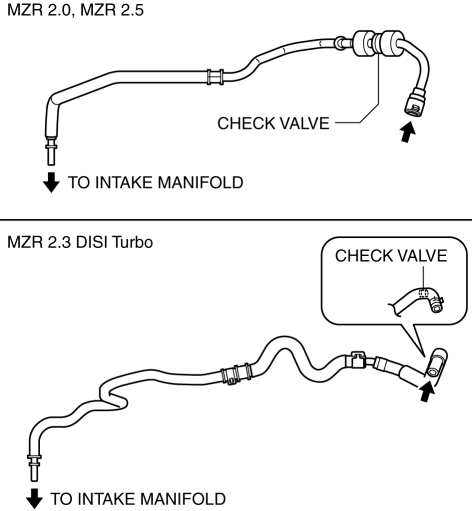
-
If there is any malfunction of the inner check valve, replace it together with the vacuum hose as a single unit.
SKYACTIV-G 2.0
1. Remove the vacuum hose..
2. Verify that air can be blown from the power brake unit side of the vacuum hose towards the vacuum pump side, and that air cannot be blown in the opposite direction.
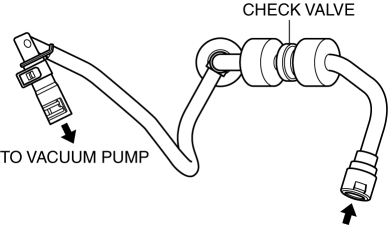
-
If there is any malfunction of the inner check valve, replace it together with the vacuum hose as a single unit.
 Vacuum Hose Removal/Installation [Skyactiv G 2.0]
1. Remove the plug hole plate..
2. Remove the battery and battery tray..
3. Remove the vacuum hose from the vacuum hose clip.
4. Pinch open the clamp using pliers and disconnect the vacuum h ...
 Vacuum Pump Inspection [Skyactiv G 2.0]
1. Pinch open the clamp using pliers and disconnect the vacuum hose from the
vacuum pump.
2. Install the vacuum gauge as shown in the figure, then check the vacuum.
3. Warn up the engin ...
Other materials:
Headliner Removal/Installation
1. Shift to the D (ATX) or 4th gear (MTX) position. (4SD)
2. Disconnect the negative battery cable..
3. Remove the rain sensor cover. (Vehicles with auto light/wiper system).
4. Disconnect the rain sensor connector. (Vehicles with auto light/wiper system)
5. Partially peel back the seaming ...
Input/Turbine Speed Sensor Removal/Installation [FS5 A EL]
CAUTION:
Always use a new bolt. If the removed input/turbine speed sensor installation
bolt is reused, it may cause oil leakage.
A sealant coating is applied to the input/turbine speed sensor installation
bolt to prevent oil leakage from the installation bolt hole which passes ...
Advanced Park guidance screens
The Subaru Solterra Advanced Park system provides clear and intuitive guidance
screens on the multimedia display, helping the driver easily understand vehicle
positioning and parking operations in real time.
Guidance screen (When assistance starts)
Target parking space box (blue)
Ad ...
