
Mazda 3 Service Manual: Vacuum Pump Inspection [Skyactiv G 2.0]
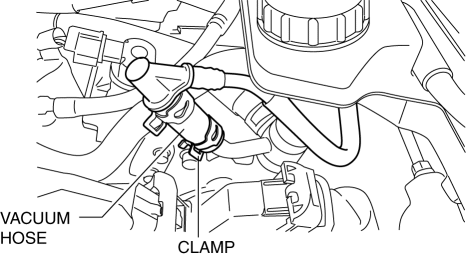
1. Pinch open the clamp using pliers and disconnect the vacuum hose from the vacuum pump.
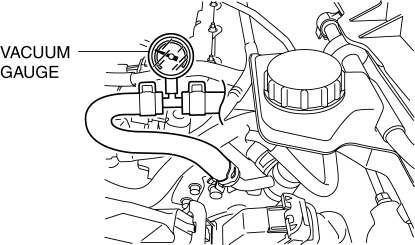
2. Install the vacuum gauge as shown in the figure, then check the vacuum.
3. Warn up the engine.
-
If the pressure is less than the specification, inspect for the following.
-
Malfunction of the vacuum pump
-
Shortage of the lubrication oil pressure
|
Measurement condition |
Specification |
|
|
Engine speed |
Change in vacuum amount |
Period of time change in vacuum amount condition met |
|
While idling (520—700 rpm (reference value)) |
From 60 kPa {450 mmHg, 18 inHg} to 67 kPa {503 mmHg, 20 inHg} |
8 s or less |
Vacuum pump maximum vacuum specification (reference value) (SKYACTIV-G 2.0)
|
Measurement condition |
Specification |
|
While idling (no time designation) |
93.3 kPa {700 mmHg, 27.6 inHg} or more |
4. Install in the reverse order of the removal.
 Vacuum Line Inspection
MZR 2.0, MZR 2.5, MZR 2.3 DISI Turbo
1. Remove the vacuum hose..
2. Verify that air can be blown from the power brake unit side of the vacuum
hose towards the intake manifold side, and that air c ...
 Vacuum Pump Removal/Installation [Skyactiv G 2.0]
1. Remove the plug hole plate..
2. Remove the battery and battery tray..
3. Pinch open the clamp using pliers and disconnect the vacuum hose from the
vacuum pump.
4. Remove in the order sh ...
Other materials:
Motor compartment
Components
Heater coolant reservoir
Washer fluid tank
Power control unit coolant reservoir
12-volt battery
Brake fluid reservoir
Fuse box
Radiator
Condenser
Electric cooling fan
Checking the heater coolant
In the Subaru Solterra, the heater coolant level should always b ...
Control Valve Body Removal/Installation [FS5 A EL]
Primary Control Valve Body On-Vehicle Removal
WARNING:
A hot transaxle and ATF can cause severe burns. Turn off the engine and wait
until they are cool.
Using compressed air can cause dirt and other particles to fly out, causing
injury to the eyes. Wear protective eyeglasses w ...
Selecting wheel set
The Subaru Solterra is equipped with an advanced tire pressure warning system
that supports registration of two separate wheel sets. This feature allows you to
conveniently switch between different configurations, such as summer and winter
tires, without reprogramming the system each time.
Th ...
