
Mazda 3 Service Manual: Windshield Wiper And Washer Switch Inspection
1. Disconnect the negative battery cable..
2. Remove the following parts:
a. Front scuff plate (Driver‘s side).
b. Front side trim (Driver‘s side).
c. Hood release lever.
d. Upper panel.
e. Shift knob (MTX).
f. Selector lever knob (ATX).
g. Shift panel.
h. Side wall.
i. Console.
j. Lower panel.
k. Column cover.
l. Wiper and washer switch.
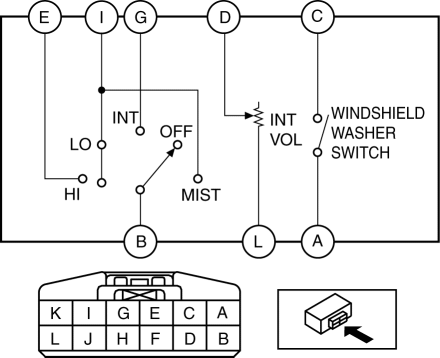
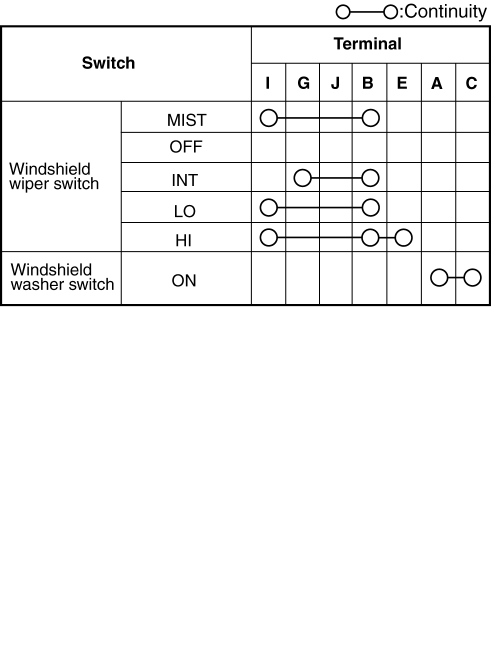
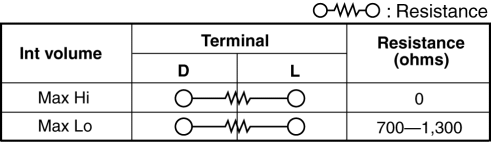
3. Verify that the resistance and continuity between the windshield wiper and washer switch terminals as indicated in the table.
-
If the continuity is not as indicated in the table, or if the resistance is not within the specification, replace the windshield wiper and washer switch.
Vehicles With Auto Wiper System
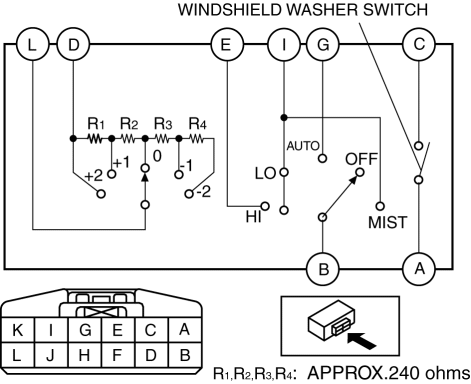
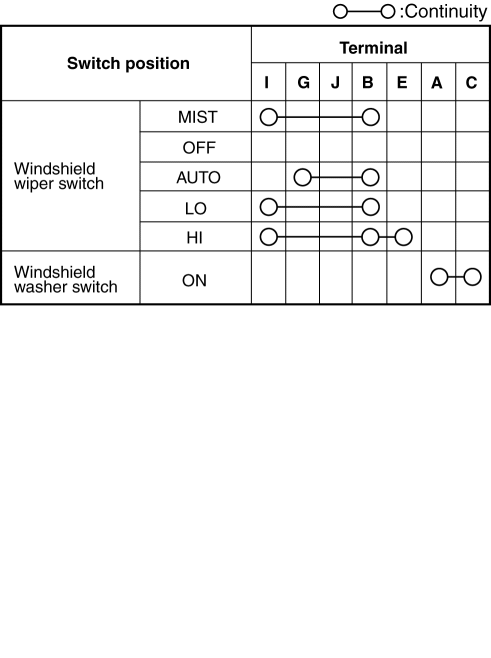
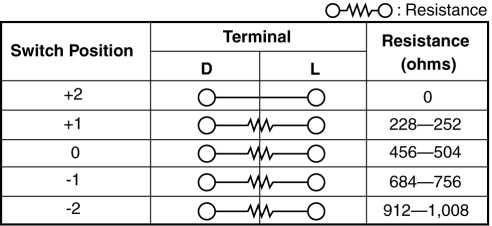
Vehicles Without Auto Wiper System
 Rear Wiper And Washer Switch Inspection
1. Disconnect the negative battery cable..
2. Remove the following parts:
a. Front scuff plate (Driver‘s side).
b. Front side trim (Driver‘s side).
c. Hood release lever.
d. Lower panel. ...

Other materials:
Sae Standards
In accordance with new regulations, SAE (Society of Automotive Engineers)
standard names and abbreviations are now used in this manual. The table below
lists the names and abbreviations that have been used in Mazda manuals up to
now and their SAE equivalents.
...
Check Valve Inspection [Skyactiv G 2.0]
Airflow Inspection
1. Remove the vacuum hose..
2. Blow air into the vacuum hose using your mouth from the vacuum pump side and
verify that the air flows to the intake manifold side, then blow air from the intake
manifold side and verify that the air does not flow to the vacuum pump side.
...
Instrument Cluster Configuration
1. Connect the M-MDS (IDS) to the DLC-2.
2. After the vehicle is identified, select the following items from the initialization
screen of the IDS.
Select the “Module Programming”.
3. Then, select items from the screen menu in the following order.
Select “Programma ...
