
Mazda 3 Service Manual: Windshield Wiper Arm And Blade Removal/Installation
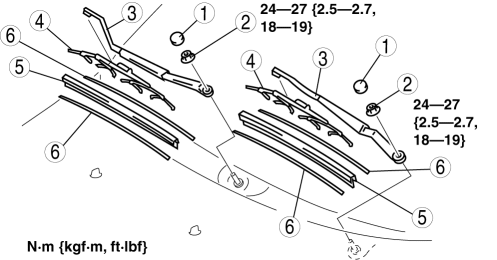
1. Remove in the order indicated in the table.
|
1 |
Cap |
|
2 |
Nut |
|
3 |
Windshield wiper arm (See Windshield Wiper Arm Installation Note.) |
|
4 |
Windshield wiper blade |
|
5 |
Rubber brush |
|
6 |
Backing plate |
2. Install in the reverse order of removal.
3. Adjust the windshield wiper arm and blade..
Windshield Wiper Arm Installation Note
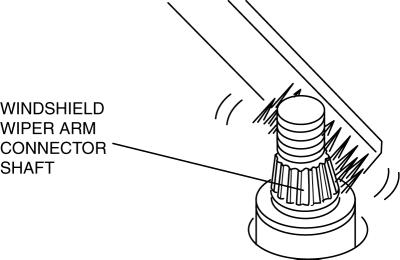
1. Clean the windshield wiper arm connector shafts using a wire brush before installing the windshield wiper arms.
 Windshield Wiper Arm And Blade Adjustment
1. Operate the windshield wipers, and then turn off the windshield wiper motor
to set the wipers in the auto stop position.
2. Slide the serrated connecting part and adjust the windshield wiper ar ...
 Windshield Wiper Motor Disassembly/Assembly
1. Disassemble in the order indicated in the table.
1
Wiper link No.1
(See Ball Joint Assembly Note.)
2
Wiper link No.2
(See Ball Joint ...
Other materials:
Declaration of Conformity
Keyless Entry System/Immobilizer System
Blind Spot Monitoring (BSM) System
NOTE
During printing time of this user manual the approvals listed above are granted.
WARNING
Change or modifi cations not expressively approved by the party
responsible for
compliance could voi ...
Vehicle Engine Control Unit Reset Procedure
NOTE
This procedure is intended for vehicles with the engine oil flexible
maintenance setting
selected.
After replacing the engine oil, have a repair shop such as an Authorized
Mazda Dealer
perform the initialization (engine oil data resetting) of the recorded value. If
the value
recorded ...
Judder Upon Torque Converter Clutch (TCC) Operation [Fw6 A EL]
TROUBLESHOOTING ITEM
Judder upon torque converter clutch (TCC) operation
DESCRIPTION
Vehicle jolts when TCC is engaged.
POSSIBLE CAUSE
Signal malfunction
APP ...
