
Mazda 3 Service Manual: Cargo Compartment Light Removal/Installation
1. Disconnect the negative battery cable..
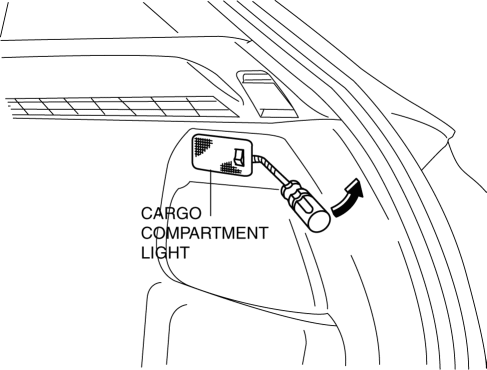
2. Insert a tape-wrapped fastener remover into the service hole and pry with the screwdriver in the direction shown by the arrow to remove the cargo compartment light.
3. Disconnect the connector.
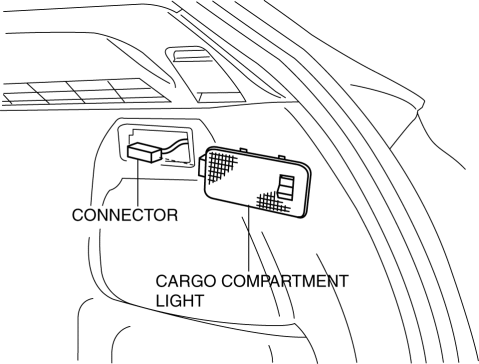
4. Remove the cargo compartment light.
5. Install in the reverse order of removal.
 Cargo Compartment Light Inspection
1. Disconnect the negative battery cable..
2. Remove the cargo compartment light..
3. Verify that the continuity between the cargo compartment light terminals is
as indicated in the table.
...
 Ignition Key Illumination Removal/Installation
1. Disconnect the negative battery cable..
2. Remove the column cover upper..
3. Remove the ignition key illumination bulb.
4. Install in the reverse order of removal. ...
Other materials:
Air Intake Actuator Removal/Installation [Full Auto Air Conditioner]
1. Set the air intake mode to FRESH.
2. Disconnect the negative battery cable..
3. Remove the following parts:
a. Front scuff plate (Passenger-side).
b. Front side trim (Passenger-side).
c. Dashboard under cover.
d. Glove compartment.
e. Lower panel (Passenger-side).
f. Shower duct ( ...
Compression Inspection [Mzr 2.0, Mzr 2.5]
WARNING:
Hot engines and oil can cause severe burns. Be careful not to burn yourself
during removal/installation of each component.
Fuel vapor is hazardous. It can very easily ignite, causing serious injury
and damage. Always keep sparks and flames away from fuel.
Fuel ...
Rain Sensor Removal/Installation
1. Disconnect the negative battery cable..
2. Spread open the rain sensor cover in the direction of the arrows and disengage
tabs A to remove it.
3. Disconnect the rain sensor connector.
4. Slide rain sensor tab B in the direction of the arrow shown in the figure
and detach tab B. ...
