
Subaru Solterra 2023-2026 Owner's Manual: Charging equipment
Charging equipment and names
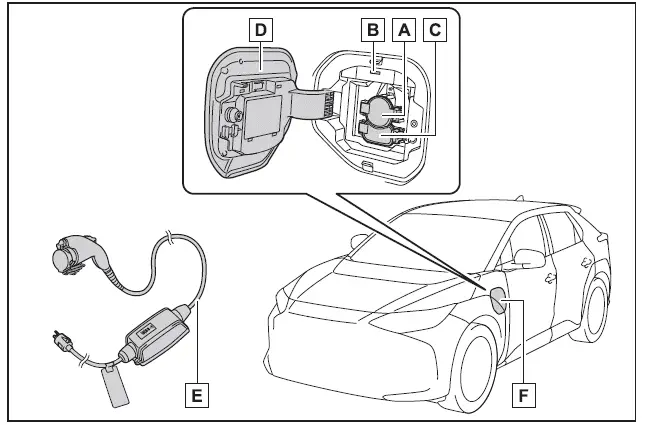
- AC charging inlet
- Charging indicator and charging inlet light
- DC charging inlet
- Charging port lid
- AC charging cable (if equipped)*
- Charging port
*: For safe handling procedures and precautions related to the AC charging cable, always refer to the dedicated manual provided with the Subaru Solterra.
Opening/closing the charging port lid
■ Open
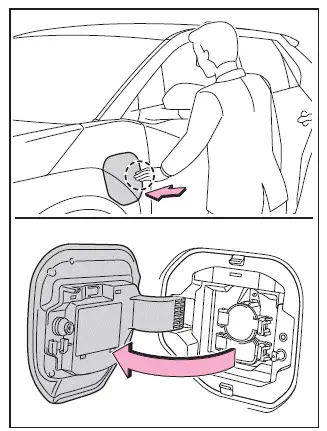
To access the charging port on the Subaru Solterra, gently press the rear edge of the charging port lid as indicated in the illustration. Once released, manually open the lid fully.
■ Close
To close the charging port lid, first position it slightly open, then press the rear edge firmly until it securely locks into place.
■ About lid lifter
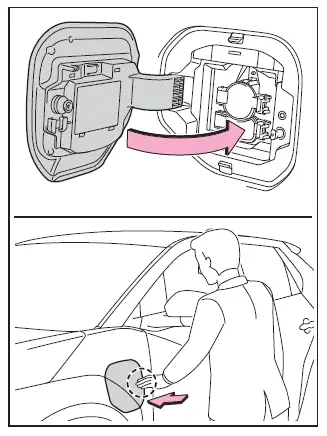
- If the lid lifter is pressed inward before closing the charging port lid, the lid may not close properly. In this case, ensure the vehicle is unlocked, press the lid again to release the lifter mechanism, and then close the charging port lid securely.
■ About the charging port lid open/close detection switch
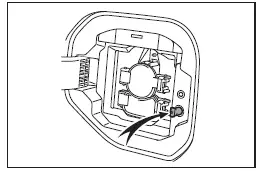
When the charging port lid of the Subaru Solterra is open, avoid touching the detection switch located near the lid mechanism.
Accidental contact with this switch may cause the system to incorrectly detect the lid status, potentially resulting in inaccurate system notifications.
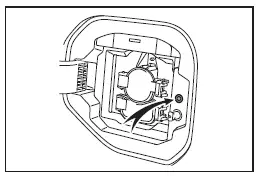
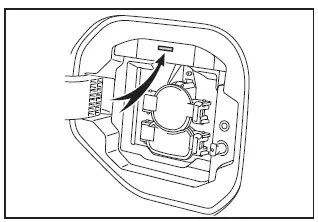
Charging indicator
The Subaru Solterra charging indicator uses different illumination and flashing patterns to inform the driver about the current charging status.
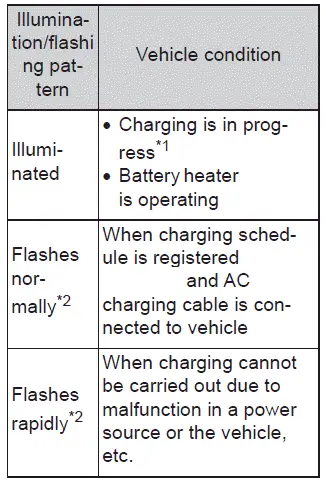
*1: The indicator light becomes dim once charging is fully completed
*2: The indicator flashes for a certain period and then turns off automatically.
Understanding these indicators helps Subaru Solterra drivers better monitor charging progress and ensure the vehicle is ready for efficient and reliable operation.
 Driving range
The driving range displayed on the multi-information display of the
Subaru Solterra represents an estimated reference distance based on current conditions.
The actual distance that can be traveled ...
 AC charging cable
This section explains the functionality, proper handling procedures,
and safety considerations for the AC charging cable used with the Subaru Solterra,
ensuring efficient and secure charging in ev ...
Other materials:
Control Switches
AUTO switch
By pressing the AUTO switch the
following functions will be automatically
controlled in accordance with the selected
set temperature:
Airflow temperature
Amount of airflow
Selection of airflow mode
Outside/Recirculated air selection
Air conditioner operation
NOTE
AUTO ...
Parking brake
The parking brake system in the Subaru Solterra can be engaged or
released either automatically or manually, providing flexibility and enhanced convenience
depending on driving conditions.
When operating in automatic mode, the Subaru Solterra intelligently manages the
parking brake, activat ...
Parking in an Emergency
The hazard warning lights should always
be used when you stop on or near a
roadway in an emergency
The hazard warning lights warn other
drivers that your vehicle is a traffic hazard
and that they must take extreme caution
when near it.
Depress the hazard warning flasher and
all the t ...
