
Mazda 3 Service Manual: Rear ABS Wheel Speed Sensor Removal/Installation
1. Remove the under cover..
2. Remove in the order indicated in the table.
3. Install in the reverse order of removal.
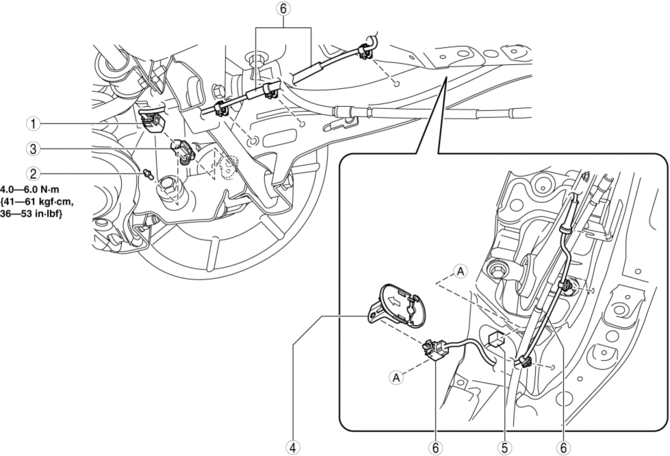
|
1 |
Connector |
|
2 |
Bolt |
|
3 |
Rear ABS wheel-speed sensor |
|
4 |
ABS hole cover . |
|
5 |
Connector |
|
6 |
Rear ABS wheel-speed sensor wiring harness (See Rear ABS Wheel-speed Sensor Wiring Harness Installation Note.) |
ABS Hole Cover Removal Note
1. Press the tab of the ABS hole cover to separate the ABS hole cover from the body.
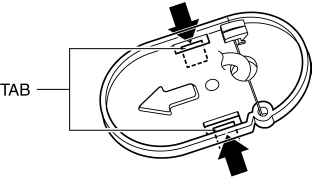
2. Remove the ABS hole cover from the body.
Rear ABS Wheel-speed Sensor Wiring Harness Installation Note
1. Pass the rear ABS wheel-speed sensor wiring harness outside the rear parking brake cable as shown in the figure.
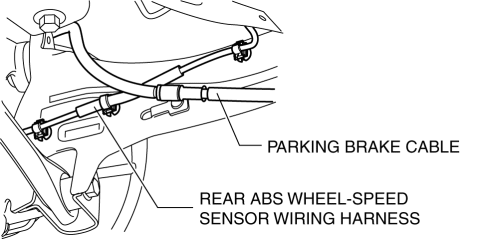
2. Install the rear ABS wheel-speed sensor wiring harness.
ABS Hole Cover Installation Note
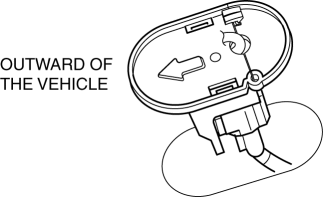
1. Install the ABS hole cover into the body so that the arrow on it is facing toward the outer side of the vehicle.
 Rear ABS Wheel Speed Sensor Inspection
Installation Visual Inspection
1. Inspect for the following:
If there is any malfunction, replace the part.
a. Excessive looseness or play of the rear ABS wheel-speed sensor
b. Deform ...

Other materials:
Rear Door Child Safety Locks
These locks are intended to help prevent
children from accidentally opening the
rear doors. Use them on both rear doors
whenever a child rides in the rear seat of
the vehicle.
If you slide the child safety lock to the
lock position before closing that door, the
door cannot be opened from th ...
Washer Motor Removal/Installation
4SD
1. Disconnect the negative battery cable..
2. Remove the front mudguard (RH)..
3. Remove in the order indicated in the table.
1
Windshield washer hose
2
Washer motor connector
3
Washer motor
...
Rear Door Speaker Removal/Installation
1. Disconnect the negative battery cable..
2. Remove the rear door trim..
3. Disconnect the connector.
Without Bose®
With Bose®
4. Remove the screw.
5. Remove the rear door speaker in the direction of the arrow shown in the figure.
Without Bose®
With Bose®
6. Insta ...
