
Mazda 3 Service Manual: Keyless Beeper Inspection
1. Disconnect the negative battery cable..
2. Remove the front mudguard..
3. Remove the keyless beeper..
4. When applying battery positive voltage to the keyless beeper, verify that an electromagnetic sound is heard.
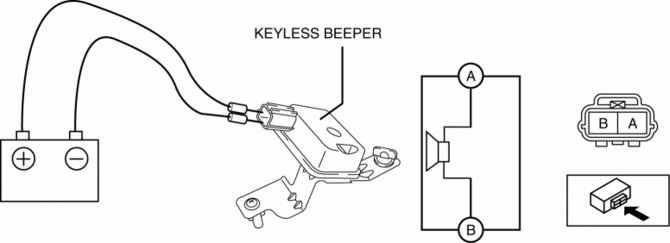
-
If the sound cannot be verified, replace the keyless beeper.
 Keyless Antenna Removal/Installation
Interior, Front
1. Disconnect the negative battery cable..
2. Remove the following parts:
a. Upper panel.
b. Shift knob (MTX).
c. Selector lever knob (ATX).
d. Shift panel.
e. Side wall. ...
 Keyless Beeper Removal/Installation
1. Disconnect the negative battery cable..
2. Slightly bend back the front mudguard..
3. Disconnect the connector.
4. Remove the keyless beeper in the direction of the arrow shown in the fig ...
Other materials:
Refrigerant Pressure Sensor Inspection [Full Auto Air Conditioner]
MZR 2.3 DISI Turbo, MZR 2.5
1. Install the manifold gauge.
2. Verify the high-pressure side reading of the manifold gauge.
3. Measure the terminal voltage of the climate control unit.
1C, 1E and 2J
4. Verify that below graph as measure the terminal voltage 2J.
5. Follow the clim ...
DSC Sensor Initialization Procedure
WARNING:
If the DSC sensor initialization procedure is not completed, the DSC will
not operate properly and it might cause an unexpected accident. Therefore, after
replacing or removing the DSC HU/CM or SAS control module, make sure to perform
the DSC sensor initialization procedure ...
Assist Handle Removal/Installation
Assist Handle Removal
1. Insert a flathead screwdriver into the service hole and remove the assist
handle covers.
2. Remove the assist handle in the direction of the arrow (1) and (2), while
detach the clip.
NOTE:
Remove the assist handle by shaking it up and down.
Ass ...
