
Mazda 3 Service Manual: Rear Center Seat Belt Removal/Installation
CAUTION:
-
The ELR (emergency locking retractor) has a spring that will unwind if the retractor cover is removed. The spring cannot be rewound by hand. If this occurs, the ELR will not work properly. Therefore, do not disassemble the retractor.
4SD
1. Remove the following parts:
a. Rear scuff plate.
b. Rear seat cushion.
c. Rear seat back.
d. Tire house trim.
e. C-pillar trim..
f. Rear package trim.
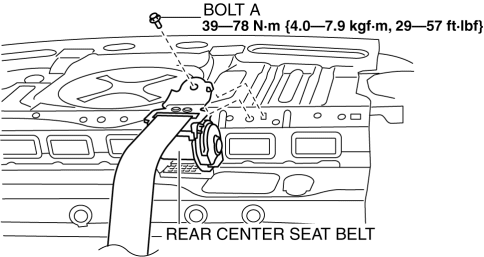
2. Remove the bolt A.
3. Remove the bolt B.
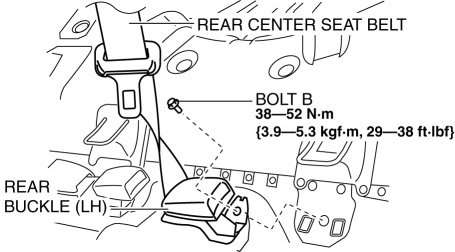
4. Remove the rear center seat belt.
5. Install in the reverse order of removal..
5HB
1. Remove the following parts:
a. Rear scuff plate.
b. Rear seat cushion.
2. Remove the bolt.
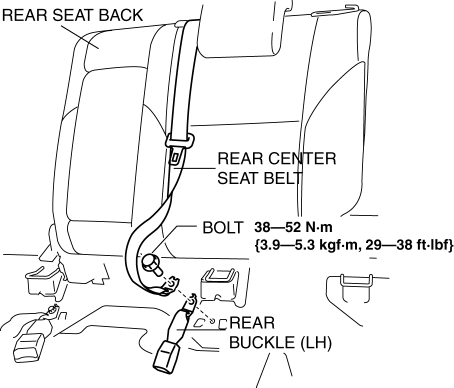
3. Remove the rear center seat belt with the rear seat back..
4. Install in the reverse order of removal..
Rear Center Seat Belt Installation Note
-
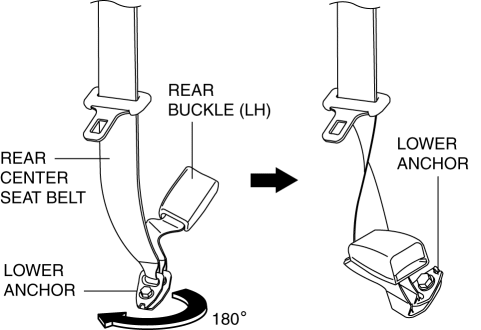
Rotate the rear center seat belt lower anchor clockwise 180° and install it.
 Drive Belt Removal/Installation [Skyactiv G 2.0]
WARNING:
A hot engine can cause severe burns. Turn off the engine and wait until it
is cool before servicing.
NOTE:
Remove/install the drive belt from the underside of the veh ...
 Timing Chain Removal/Installation [Mzr 2.0, Mzr 2.5]
1. Remove the battery cover..
2. Disconnect the negative battery cable..
3. Remove the plug hole plate..
4. Disconnect the wiring harness.
5. Remove the ignition coils..
6. Remove the spark ...
Other materials:
EGR Valve Inspection [Mzr 2.0, Mzr 2.5]
Resistance Inspection
1. Remove the battery cover..
2. Disconnect the negative battery cable..
3. Disconnect the EGR valve connector.
4. Measure the resistance between the EGR valve terminals.
EGR valve terminal
Resistance inspection (ohm)
...
Bluetooth ® Preparation (Type B)
Device pairing
To use Bluetooth ® audio and Hands-Free,
the device equipped with Bluetooth ® has
to be paired to the unit using the following
procedure. A maximum of seven devices
including Bluetooth ® audio devices and
hands-free mobile phones can be paired.
NOTE
The Bluetooth ® system ...
Front Seat Cover Removal/Installation [Vehicles With Power Seat System]
WARNING:
Handling a front seat (with built-in side air bag) improperly can accidentally
operate (deploy) the air bag, which may seriously injure you. Read the service
warnings before handling a front seat (with built-in side air bag)..
CAUTION:
After removing a front seat ...
